

- Overview
- Countries & currencies
- Integration
- Process flows
- Testing
- Additional information
- Consumer experience
- Reporting
Process flows
Below, you'll find a detailed explanation of the statuses for Patagonia 365 payments across various flows. In order to integrate Patagonia 365, please refer to our API Reference.
Transaction states
Payment flow
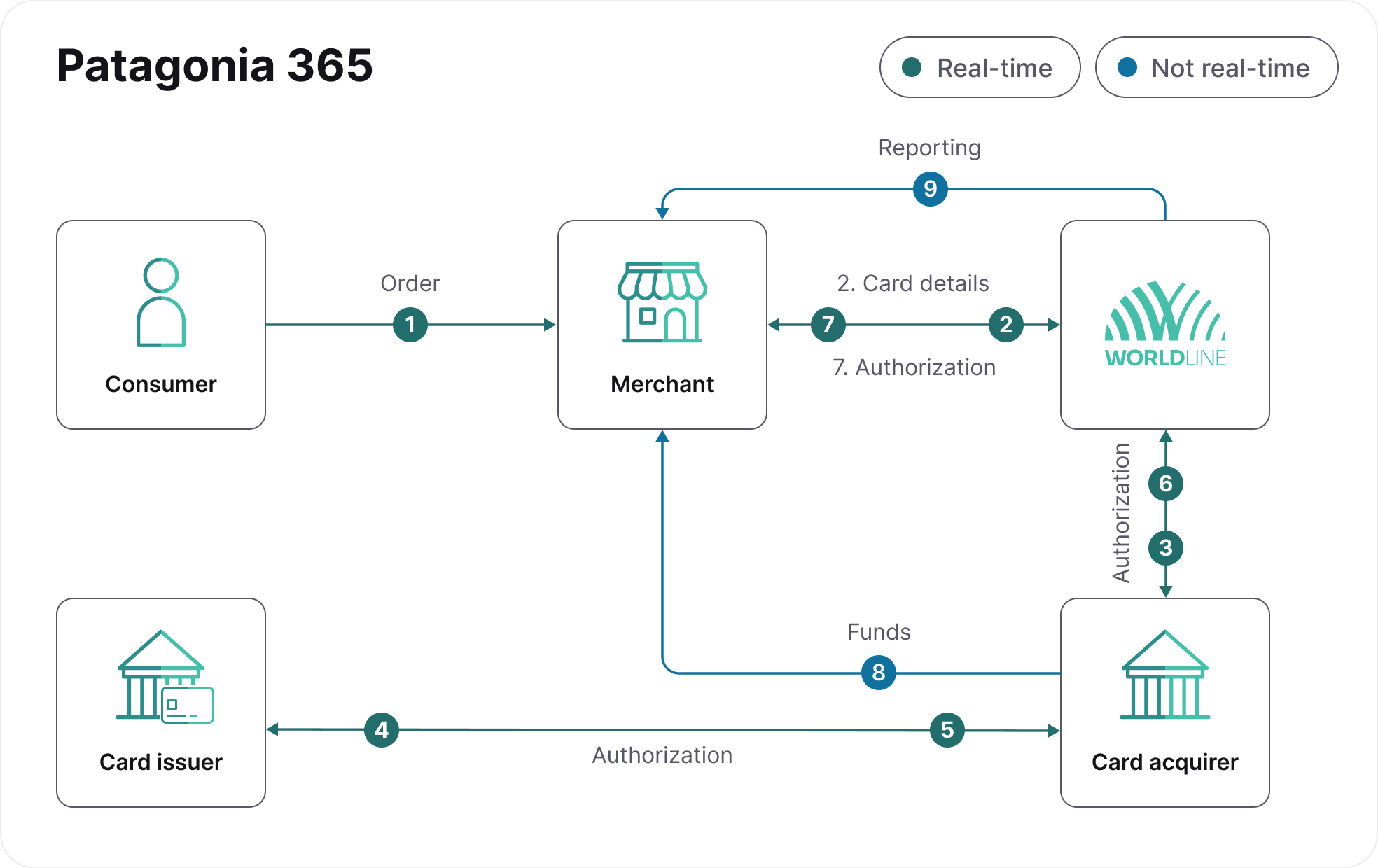
- The consumer places an order on your website and chooses Patagonia 365 as their payment product during checkout.
- Your server sends the payment request to us containing the card payment details.
- We perform card validation and, if approved, forward it to the acquirer.
- The acquirer redirects the authorization request to the card issuing bank.
- The card issuing bank processes the transaction in real-time, returning an authorization or decline response.
- The acquirer sends the response to us.
- We return the request response result to you - if the request is authorized, you can choose to release the product or service to the consumer.
- The card acquirer settles funds directly to your bank account under your existing agreement with them.
- We provide both online and offline daily reports detailing the transactions we've received.