
Universal Commerce Protocol
The Universal Commerce Protocol is a standard that allows AI platforms such as Gemini and AI Mode in Search to discover your products, build shopping carts, and complete purchases on your commerce backend. (For background on agentic commerce in general, see Agentic commerce).
Universal Commerce Protocol has three key components. First, you make yourself discoverable by publishing a Universal Commerce Protocol profile that let AI platforms discover and negotiate capabilities. Any Universal Commerce Protocol - compatible AI platform can read this profile and transact with you. Second, Universal Commerce Protocol uses payment handlers, where you provide your payment configuration (such as accepted payment methods and payment service provider specific parameters) to accept transactions initiated by AI platforms. Lastly, you maintain the customer relationship, your pricing and tax logic.
How the Universal Commerce Protocol works
With the Universal Commerce Protocol, you can publish a single profile describing your business capabilities, like product catalogs, cart building, checkout, payment, and order management. AI platforms can discover your profile and process transactions using a common standard. This eliminates the need to build separate integrations for each AI platform.
A Universal Commerce Protocol transaction involves three participants, each with distinct responsibilities:
- The platform (the AI agent). An AI agent such as Gemini or AI Mode in Search discovers your products, builds shopping carts, manages the checkout session, and acquires payment credentials to complete transactions on behalf of consumers.
- The business (you). Declare your product catalogs, shopping capabilities, and supported payment methods. Process the resulting payment through your payment provider and remain the merchant of record. Raw card details are never received by your systems.
- The payment & credential provider. The payment and credential provider (such as Google Pay or Worldline) supplies and secures the payment credential. It manages how payment instruments are acquired and secured so that sensitive payment data does not pass through the AI platform or your servers.
Checkout
The checkout capability enables the AI platform to create and manage a checkout session with your backend. The platform confirms items, collects buyer and shipping details, applies discounts, calculates totals, and places the order.
Before checkout begins, your products must be discoverable by the AI platform. On Google's AI platforms, this is handled through your Merchant Center product feed. Products can also be exposed through the Universal Commerce Protocol Catalog Capability.
Checkout operations
The AI platform calls your endpoints sequentially to manage the checkout state on your server:
| Operation | Method | Endpoint | Purpose |
|---|---|---|---|
| Create Checkout | POST | /checkout-sessions | Start a new checkout session |
| Get Checkout | GET | /checkout-sessions/{id} | Retrieve the current checkout state |
| Update Checkout | PUT | /checkout-sessions/{id} | Update items, shipping, or consumer details |
| Complete Checkout | POST | /checkout-sessions/{id}/complete | Finalize the checkout and process payment |
| Cancel Checkout | POST | /checkout-sessions/{id}/cancel | Cancel an active checkout session |
Create Checkout starts the session, Update Checkout continues as the consumer adds items and details, and Complete Checkout finalizes the order. When the Complete Checkout call is received, pass the payment credentials to Worldline to process the payment. Implement these endpoints according to the Universal Commerce Protocol checkout specification. Maintain the checkout state on your backend and translate checkout fields into Worldline payment requests before forwarding them to Worldline.
Each response includes a status and a messages array. Set the status to indicate the checkout state and include messages to tell the platform what is needed to proceed. A session typically progresses through these states: incomplete (information missing), ready_for_complete (all details collected), and completed (order placed).
When the status is ready_for_complete, the AI platform obtains a secure payment credential through the selected payment handler and submits it with the Complete Checkout call to finalize the order.
How payments work: the three-step model
The Universal Commerce Protocol payment handler framework defines a three-step payment lifecycle.
- Negotiation: Declare the payment methods supported in your Universal Commerce Protocol profile, including your payment provider configuration. The AI platform matches these to what it can offer consumers.
- Acquisition:The AI platform works directly with the payment and credential provider to obtain a secure payment credential (such as an encrypted Google Pay token). Raw card data does not reach your servers or the platform.
- Completion: The AI platform submits the payment credential to you at checkout completion. Pass it to your payment service provider to process the payment.
The AI platform orchestrates the purchase while the payment and credential provider manages the payment credential. The AI platform does not handle raw card data, and you process the credential through your existing relationship with your payment provider.
Process flow
The Universal Commerce Protocol flow involves different parties: the merchant (you), the consumer (the shopper), the platform (the AI agent), the credential provider (the wallet or vault that secures the payment), and the payment service provider (such as Worldline, which processes the payment on your behalf). As the merchant, you expose a set of UCP endpoints that the AI agent calls to drive the purchase.
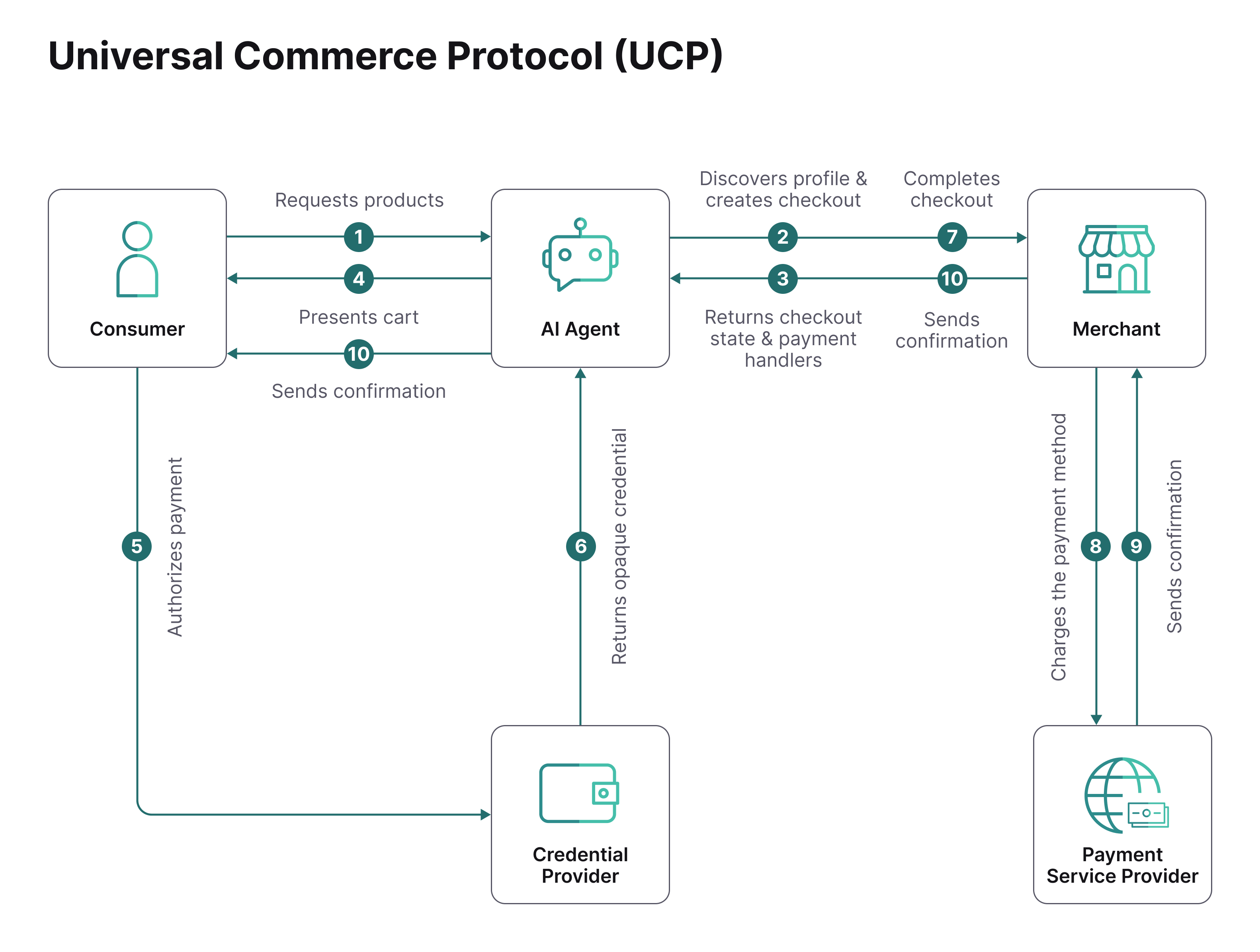
- Consumer expresses purchase intent to the platform (AI Agent), for example, "Book this trip".
- Platform discovers the business (you) Universal Commerce Protocol profile at /.well-known/ucp and creates a checkout session.
- You return the checkout state (e.g. ready_for_complete) and the payment handlers it supports.
- Platform presents the order summary and available payment methods to the consumer.
- Consumer authorizes payment with selected payment method.
- Credential provider returns an opaque payment credential to the platform.
- Platform submits Complete Checkout with the payment credential.
- You send the payment credential to the payment service provider to process the payment.
- Payment service provider returns the authorization confirmation to you.
- You confirm the order, and send a notification back to the consumer through the platform.
Accept Payments on Google's AI Platforms
When you sell on Google's AI platforms, consumers can purchase your products directly in Gemini and AI Mode in Search, with Worldline processing the payment on your behalf.
In Google's implementation, the roles are as follows:
- Platform: Gemini and AI Mode in Search.
- Business: You.
- Payment credential provider: Google Pay. Consumers pay using the card and shipping details stored in their Google Wallet and confirm the purchase in a Google Pay sheet within the AI platform. Google plans to support additional payment methods over time.
- Payment processor: Worldline can process Google Pay tokens for your standard online checkout.
Declare a Google Pay payment handler to offer Google Pay as a checkout option in Gemini and AI Mode. In the handler, specify Worldline as your payment gateway and provide your Worldline merchant ID. This allows Worldline to securely process the Google Pay transactions that Gemini and AI Mode initiate with you.
If you already accept Google Pay through Worldline, most of the payment integration is in place. The remaining work involves Universal Commerce Protocol commerce integration: creating your Universal Commerce Protocol profile and checkout endpoints.
Integration
To accept payments on Google's AI platforms, follow these steps:
- Prepare your product data in Google Merchant Center to make your products available in Gemini and AI Mode in Search. Refer to Google's setup guidance.
- Configure Google Pay with Worldline as your payment gateway so Worldline can process Google Pay payments at checkout completion using your existing integration. Contact your Account Manager to enable Google Pay for your account.
- Implement the Universal Commerce Protocol checkout endpoints so the AI platform can create and complete checkout sessions with your backend systems. Refer to Google's checkout integration guide.
- Publish a Universal Commerce Protocol profile describing your supported capabilities and Google Pay payment configuration at /.well-known/ucp. See the example below for how to declare the Google Pay payment handler and name Worldline as your gateway. Refer to Google's profile creation guide.
- Complete Google's review before going live on Gemini and AI Mode in Search.
Declare the Google Pay payment handler with Worldline as your payment gateway
Configure the following fields in your Universal Commerce Protocol payment handler to enable Google's AI platforms to initiate payments with you via Worldline.
See an example configuration below and the full manifest example of the Google Pay payment handler in your Universal Commerce Protocol profile.
| Field | Description |
|---|---|
| tokenization_specification.type | PAYMENT_GATEWAY *use this exact value |
| tokenization_specification.parameters.gateway | globalcollect *use this exact value |
| tokenization_specification.parameters.gatewayMerchantId | Your merchant ID with us *use the value of your merchant ID |
{
"allowed_payment_methods": [
  {
    "type": "CARD",
    "parameters": {
      "allowed_auth_methods": ["PAN_ONLY"],
      "allowed_card_networks": ["MASTERCARD", "VISA"]
    },
    "tokenization_specification": {
      "type": "PAYMENT_GATEWAY",
      "parameters": {
        "gateway": "globalcollect",
        "gatewayMerchantId": "your Worldline merchant ID"
      }
    }
  }
]
Receive the encrypted payment token from Google
When the consumer confirms the order, Google initiates a Complete Checkout call to your server via POST /checkout-sessions/{id}/complete. Receive the encrypted payment token in the property payment.instruments.credential.token and pass it to Worldline in your payment creation request.
{
{
  "ucp": {
    "version": "2026-04-08"
  },
  "id": "bf8c1b4b-6b1c-4c6a-8f2a-53c2a7c3b2e1",
  "status": "ready_for_complete",
  "currency": "USD",
  "line_items": [
    {
      "id": "li_1",
      "item": {
        "id": "prod_12345",
        "title": "Wireless Headphones",
        "subtitle": "Noise-cancelling, Black",
        "price": 12900,
        "image_url": "https://example.com/images/headphones.jpg"
      },
      "quantity": {
        "total": 1
      },
      "totals": [
        {
          "type": "subtotal",
          "amount": 12900
        },
        {
          "type": "total",
          "amount": 12900
        }
      ]
    },
    {
      "id": "li_2",
      "item": {
        "id": "prod_67890",
        "title": "USB-C Cable",
        "subtitle": "2m, Braided",
        "price": 1499,
        "image_url": "https://example.com/images/cable.jpg"
      },
      "quantity": {
        "total": 2
      },
      "totals": [
        {
          "type": "subtotal",
          "amount": 2998
        },
        {
          "type": "total",
          "amount": 2998
        }
      ]
    }
  ],
  "totals": [
    {
      "type": "subtotal",
      "amount": 15898,
      "label": "Subtotal"
    },
    {
      "type": "shipping",
      "amount": 599,
      "label": "Standard Shipping"
    },
    {
      "type": "tax",
      "amount": 1320,
      "label": "Tax"
    },
    {
      "type": "total",
      "amount": 17817,
      "label": "Total"
    }
  ],
  "fulfillment": {
    "type": "shipping",
    "destinations": [
      {
        "id": "addr_1",
        "first_name": "Jane",
        "last_name": "Smith",
        "street_address": "123 Main Street",
        "extended_address": "Suite 400",
        "address_locality": "Charleston",
        "address_region": "SC",
        "postal_code": "29401",
        "address_country": "US",
        "phone": "+15551234567"
      }
    ],
    "selected_option": {
      "id": "ship_std",
      "type": "shipping",
      "name": "Standard Shipping",
      "description": "Delivered in 3-5 business days",
      "amount": 599,
      "estimated_delivery": {
        "start": "2026-07-01",
        "end": "2026-07-03"
      }
    }
  },
  "buyer": {
    "id": "buyer_98765",
    "first_name": "Jane",
    "last_name": "Smith",
    "email": "jane.smith@example.com",
    "phone": "+15551234567",
    "locale": "en-US"
  },
  "payment": {
    "handler_id": "gpay",
    "type": "card",
    "brand": "visa",
    "last_digits": "4242",
    "billing_address": {
      "street_address": "123 Main Street",
      "extended_address": "Suite 400",
      "address_locality": "Charleston",
      "address_region": "SC",
      "postal_code": "29401",
      "address_country": "US",
      "first_name": "Jane",
      "last_name": "Smith"
    },
    "id": "instr_gp_msg_084a3d56-3491-4b5e-ae3e-b1c45b22fa50",
    "credential": {
      "type": "PAYMENT_GATEWAY",
      "token": "gpaytok_576cdc3c-5f6b-44e5-a275-0235e6779b6f"
    }
  }
}
Create the payment request
Map the encrypted token into a Worldline Connect Create payment request and call POST /v1/{merchantId}/payments. Send the token in the field mobilePaymentMethodSpecificInput.token, together with the order amount and currency. Worldline decrypts the token and processes the payment.
{
	{
    "order" : {
        "amountOfMoney" : {
            "currencyCode" : "USD",
            "amount" : 17817
        },
        "customer" : {
            "locale" : "en_US",
            "merchantCustomerId" : "1234",
            "billingAddress": {
                "countryCode": "US"
            }
        }
    },
    "mobilePaymentMethodSpecificInput": {
        "paymentProduct320SpecificInput": {
            "threeDSecure": {
                "challengeCanvasSize": "full-screen",
                "redirectionData": {
                    "returnUrl": "myapp://myapp.com"
                }
            }
        },
		"token": "gpaytok_576cdc3c-5f6b-44e5-a275-0235e6779b6f"
    }
}
To learn more about Google Pay and features, visit the Google Pay page in this documentation to learn more about Google Pay setup and integration with Worldline.
Accept payments in your own Universal Commerce Protocol implementation (In Beta)
Worldline provides a Universal Commerce Protocol payment handler that allows you to accept payments with Worldline on any Universal Commerce Protocol-compatible AI platform. Declare the Worldline Global Collect payment handler in your Universal Commerce Protocol profile to declare the payment methods you support. The AI platform discovers your payment methods, matches them to what it can offer consumers, and uses the handler configuration to acquire the payment credential and parameter data needed to complete the transaction.
To accept payments through the Worldline Global Collect payment handler, follow these steps:
1. Expose your Universal Commerce Protocol configuration
Expose your Universal Commerce Protocol configuration at the /.well-known/ucp path on your root domain. The configuration declares the capabilities you support (such as checkout and fulfillment), the services and transports you expose, and the payment handlers you accept. Also declare the Global Collect payment handler specification by referencing the payment handler specification that Worldline publishes.
{
{
  "ucp": {
    "version": "2026-04-08",
    "services": {
      "dev.ucp.shopping": [
        {
          "version": "2026-04-08",
          "spec": "https://ucp.dev/2026-04-08/specification/overview",
          "transport": "rest",
          "endpoint": "https://yourdomain.com/ucp/v1",
          "schema": "https://ucp.dev/2026-04-08/services/shopping/rest.openapi.json"
        }
      ]
    },
    "capabilities": {
      "dev.ucp.shopping.checkout": [
        {
          "version": "2026-04-08",
          "spec": "https://ucp.dev/2026-04-08/specification/shopping/checkout",
          "schema": "https://ucp.dev/2026-04-08/schemas/shopping/checkout.json"
        }
      ],
      "dev.ucp.shopping.fulfillment": [
        {
          "version": "2026-04-08",
          "spec": "https://ucp.dev/2026-04-08/specification/shopping/fulfillment",
          "schema": "https://ucp.dev/2026-04-08/schemas/shopping/fulfillment.json",
          "extends": "dev.ucp.shopping.checkout"
        }
      ]
    },
    "payment_handlers": {
      "com.worldline.globalcollect": [
        {
          "id": "worldline_globalcollect",
          "version": "2026-04-08",
          "spec": "https://ucp.connect.worldline-solutions.com/gc-payment-handler.md",
          "schema": "https://ucp.connect.worldline-solutions.com/2026-04-08/schema.json",
          "available_instruments": [
            {
              "type": "card",
              "constraints": {
                "brands": [
                  "visa",
                  "mastercard",
                  "amex"
                ],
                "acquisition_modes": [
                  "raw_card",
                  "network_token"
                ]
              }
            },
            {
              "type": "redirect",
              "constraints": {
                "products": [
                  {
                    "id": 809,
                    "name": "iDEAL / WERO",
                    "countries": [
                      "NL"
                    ],
                    "currencies": [
                      "EUR"
                    ]
                  },
                  {
                    "id": 840,
                    "name": "PayPal"
                  }
                ]
              }
            },
            {
              "type": "mobile",
              "constraints": {
                "products": [
                  {
                    "id": 320,
                    "name": "Google Pay"
                  }
                ]
              }
            }
          ]
        }
      ]
    }
  }
}
2. Implement the Universal Commerce Protocol checkout lifecycle operations
Implement the Universal Commerce Protocol checkout lifecycle using any of these approaches:
- REST endpoints - Expose standard HTTP endpoints for checkout operations.
- MCP server - Expose tools on an MCP server for agent integration.
- Agent-to-Agent (A2A) Agent Card - Enable direct agent-to-agent communication.
- Embedded checkout - Integrate checkout directly into the AI platform.
Universal Commerce Protocol Checkout Lifecycle REST Endpoints
| Operation | Method | Endpoint | Description |
|---|---|---|---|
| Create Checkout | POST | /checkout-sessions | Create a checkout session |
| Get Checkout | GET | /checkout-sessions/{id} | Retrieve a checkout session |
| Update Checkout | PUT | /checkout-sessions/{id} | Update a checkout session |
| Complete Checkout | POST | /checkout-sessions/{id}/complete | Complete the checkout and place the order |
| Cancel Checkout | POST | /checkout-sessions/{id}/cancel | Cancel a checkout session |
The AI platform calls your endpoints sequentially to manage the checkout state on your server. Create Checkout starts the session, Update Checkout continues as the consumer adds items and details, and Complete Checkout finalizes the order. When the Complete Checkout call is received, pass the payment credentials to Worldline to process the payment.
Implement these endpoints according to the Universal Commerce Protocol checkout specification. Maintain the checkout state on your backend and translate checkout fields into Worldline payment requests before forwarding them to Worldline.
3. Integrate with Connect and handle the transaction
To integrate with us in your Universal Commerce Protocol checkout endpoints, follow these two steps:
In Create Checkout handling - Call the getPaymentProduct endpoint to fetch the input fields required for each payment product. Return these fields in your checkout response so the AI platform collects all necessary consumer data before completing the purchase. Include only the additional required input fields in the product_fields array. Additional fields are those outside the standard paymentMethodSpecificInput objects. For example, Pix requires a fiscalNumber field outside the payment method input. Include this field in your response.
{
  "payment": {
    "instruments": [
      {
        "id": "offer_redirect_6105",
        "handler_id": "worldline_globalcollect",
        "type": "redirect",
        "payment_product_id": 6105,
        "display": { "name": "Pix" },
        "product_fields": [
          {
            "id": "fiscalNumber",
            "type": "string",
            "label": "Fiscalnumber (CPF)",
            "required": true,
          }
        ],
        "selected": false
      }
    ]
  }
}
In Complete Checkout handling - Call the createPayment API. Map the values from the Complete Checkout request to Worldline's createPayment request and send it to the Worldline createPayment API.
{
  "payment": {
    "instruments": [
      {
        "id": "inst_1",
        "handler_id": "worldline_globalcollect",
        "type": "card",
        "payment_product_id": 1,
        "selected": true,
        "credential": {
          "type": "worldline_connect_card",
          "networkTokenData": { /* CardPaymentMethodSpecificInput fields */ },
          "binding": { "checkout_id": "chk_123", "identity": "buyer_abc" }
        }
      }
    ]
  }
The values then need to be mapped to Connects createPayment request, and sent to our createPayment API:
{
    "order" : {
        "amountOfMoney" : {
            "currencyCode" : "USD",
            "amount" : 1500
        },
        "customer" : {
            "merchantCustomerId" : "1234",
            "billingAddress": {
                "countryCode": "US"
            }
        }
    },
    "cardPaymentMethodSpecificInput": {
		"card": {
        	"cardNumber": "xxx",
			"cvv": "123",
			"expiryDate": "1230",
			"cardholderName": "Wile E. Coyote"
		},
		"threeDSecure": {
		    "challengeCanvasSize": "full-screen",
			"redirectionData": {
				"returnUrl": "https://www.example.com"
			}
		}
    }
For a complete mapping between the Complete Checkout API and Worldline's createPayment API, see the table below:
| Universal Commerce Protocol Checkout Field | Connect Create Payment API field | Required |
|---|---|---|
| Buyer | ||
| buyer.first_name | order.customer.personalInformation.name.firstName | No |
| buyer.last_name | order.customer.personalInformation.name.surname | No |
| buyer.email | >order.customer.contactDetails.emailAddress | No |
| buyer.phone_number | order.customer.contactDetails.phoneNumber | No |
| Universal Commerce Protocol Checkout Field | Connect Create Payment API field | Required | Comment |
|---|---|---|---|
| Order totals and currency | |||
| currency | order.amountOfMoney.currencyCode | Yes | Also apply the same currency to every order.shoppingCart.items[].amountOfMoney.currencyCode |
| totals[].amount where type = total | order.amountOfMoney.amount | Yes | Read the totals array, find the entry where type = total, and use its amount. |
| Universal Commerce Protocol Checkout Field | Connect Create Payment API field | Required | Comment |
|---|---|---|---|
| Line items | |||
| line_items[] | order.shoppingCart.items[] | No | One shopping-cart item per line. |
| line_items[].item.id | order.shoppingCart.items.orderLineDetails.productSku | No | |
| line_items[].item.title + line_items[].item.subtitle | order.shoppingCart.items.orderLineDetails.productName | No | Combine title and subtitle into a single product name. |
| line_items[].item.price | order.shoppingCart.items.orderLineDetails.productPrice | No | |
| line_items[].item.image_url | order.shoppingCart.items.orderLineDetails.productImageUrl | No | |
| line_items[].quantity | order.shoppingCart.items.orderLineDetails.quantity | No | |
| line_items[].totals[].amount | order.shoppingCart.items.amountOfMoney.amount | No | Read each line item's totals array, find the entry where type = total, and use its amount. Set the currency from the top-level currency field. |
| Universal Commerce Protocol Checkout Field | Connect Create Payment API field | Required | Comment |
|---|---|---|---|
| Fulfillment | |||
| fulfillment.type | order.shipping.type | Conditional | |
| fulfillment.destinations[].first_name | order.shipping.address.name.firstName | No | |
| fulfillment.destinations[].last_name | order.shipping.address.name.surname | No | |
| fulfillment.destinations[].street_address | order.shipping.address.street AND order.shipping.address.houseNumber | Conditional | Split the street address into street name and house number in your backend. |
| fulfillment.destinations[].extended_address | order.shipping.address.additionalInfo | No | |
| fulfillment.destinations[].address_locality | order.shipping.address.city | Conditional | |
| fulfillment.destinations[].address_region | order.shipping.address.stateCode | No | |
| fulfillment.destinations[].postal_code | order.shipping.address.zip | Conditional | |
| fulfillment.destinations[].address_country | order.shipping.address.countryCode | Conditional |
| Universal Commerce Protocol Checkout Field | Connect Create Payment API field | Required | Comment |
|---|---|---|---|
| Payment | |||
| payment.instruments[] | The relevant *paymentMethodSpecificInput | Yes | The specific input block depends on the selected instrument type: card → cardPaymentMethodSpecificInput; mobile → mobilePaymentMethodSpecificInput; redirect → redirectPaymentMethodSpecificInput. |
| payment.instruments[].credential.token | The relevant *paymentMethodSpecificInput.token | Conditional | The specific input block depends on the selected payment method: Card → cardPaymentMethodSpecificInput.networkTokenData.networktoken Mobile (e.g. GooglePay) → mobilePaymentMethodSpecificInput.token |
| Universal Commerce Protocol Checkout Field | Connect Create Payment API field | Required | Comment |
|---|---|---|---|
| Billing address | |||
| payment.billing_address.first_name | order.customer.personalInformation.name.firstName | No | |
| payment.billing_address.last_name | order.customer.personalInformation.name.surname | No | |
| payment.billing_address.street_address | order.customer.billingAddress.street AND order.customer.billingAddress.houseNumber | Conditional | Split the street address into street name and house number in your backend. |
| payment.billing_address.extended_address | order.customer.billingAddress.additionalInfo | No | |
| payment.billing_address.address_locality | order.customer.billingAddress.city | Conditional | |
| payment.billing_address.address_region | order.customer.billingAddress.stateCode | No | |
| payment.billing_address.postal_code | order.customer.billingAddress.zip | Conditional | |
| payment.billing_address.address_country | order.customer.billingAddress.countryCode | Yes | ISO 3166-1 alpha-2 format. |