
Dispute
When a consumer requests to reverse a transaction, this is called a chargeback. You have the ability to dispute this chargeback within a given timeframe in an attempt to reverse the chargeback. This is sometimes also referred to as a representment.
You can dispute a chargeback by programmatically using the Dispute-related APIs.
For each dispute created, you'll need to upload evidence to support it, based on the correct chargeback reason code. Once we receive a completed dispute, we will review the evidence and forward it to the acquiring bank, who in turn will review and present it to the issuing bank, provided the supporting evidence is sufficient. It is the issuing bank who decides if the evidence provided is sufficient to withdraw the chargeback or not. The entire process regarding chargebacks and disputes is governed by the card scheme rules and regulations.
Process Flow
As illustrated in the below process flow, a dispute will complete one full circle. It's initiated by you and ultimately, feedback on the outcome of a dispute is provided back to you.
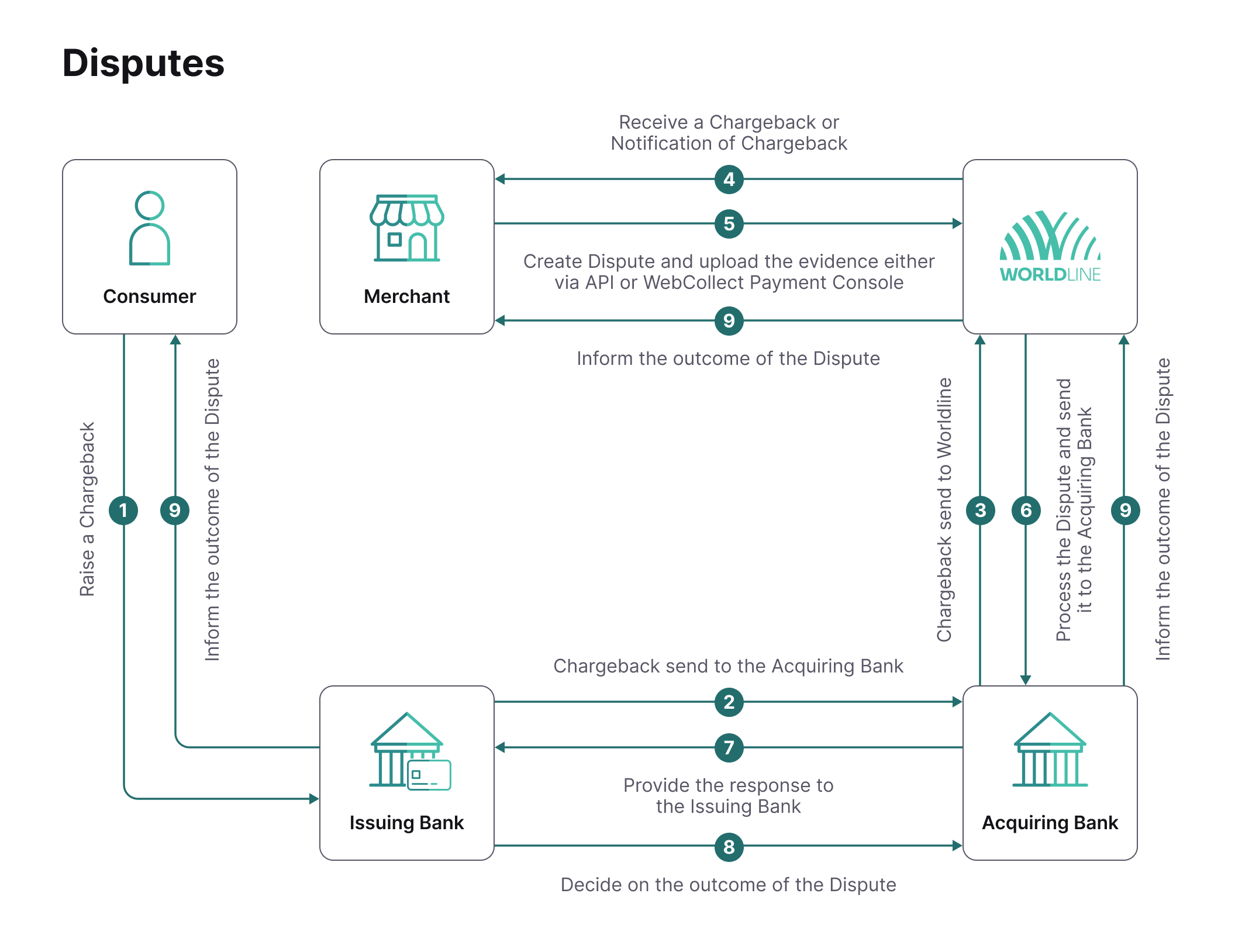
Please note that we will not receive feedback from the issuing and acquiring banks on the outcome of all cases, therefore it can occur that a dispute case is turned down but that no specific reason is given.
It's important to provide the response in the following format:
- English
- Legible
- Professional look & feel
- Structured & organized format
Dispute initiation
When a payment has one of the following statuses, you can create a dispute to fight the chargeback:
- CHARGEBACK_NOTIFICATION = NOC_RECEIVED(1400)
- CHARGEBACKED = CHARGED_BACK_BY_CONSUMER (1500)
You can create a dispute request and track its progress using our Dispute API.
Using the Dispute API to create a dispute
You can create disputes via our API in a fast automated way. By disputing a chargedback transaction, the merchant increases the chance to actually win back the value of the transaction, and therefore avoiding revenue loss.
Using the API you can create a dispute request draft, attach files to this draft and submit it for processing.
Step 1: Creating a dispute
You start with the Create Dispute API call on a transaction that is in one of the following states:
- CHARGEBACK_NOTIFICATION = NOC_RECEIVED(1400)
- CHARGEBACKED = CHARGED_BACK_BY_CONSUMER (1500)
As a minimum, your request should contain a contact person and email address. You can use the requestMessage property to provide additional information in support of your dispute. In case you want to dispute only part of chargeback, you can provide a different (lower) amount in the request. If you leave out the amount, the dispute will be done against the full amount of the chargeback. Please note that if you provide an amount, then the currency of the chargeback and the dispute should match.
Request (see also API reference)
POST https://[Gateway_base_uri]/v1/[merchant_id]/payments/[payment_id]/dispute
{
   "amountOfMoney":{
      "amount":1000,
      "currencyCode":"EUR"
   },
   "contactPerson":"Wile E. Coyote",
   "emailAddress":"wile.e.coyote@acmelabs.com",
   "replyTo":"wile.e.coyote@acmelabs.com",
   "requestMessage":"This message supports the dispute request."
}
The above request will create a new Dispute object in a DRAFT status. You need to store the ID of the created dispute, as you'll need this for subsequent API calls to upload files and submit the dispute request for processing.
Response on a successful dispute creation
{
   "disputeOutput":{
      "amountOfMoney":{
         "amount":1000,
         "currencyCode":"EUR"
      },
      "contactPerson":"Wile E. Coyote",
      "creationDetails":{
         "disputeCreationDate":"20190110110750"
      },
      "emailAddress":"wile.e.coyote@acmelabs.com",
      "files":[

      ],
      "reference":{
         "merchantOrderId":"123456",
         "paymentReference":"0",
         "providerId":"1000000071"
      },
      "replyTo":"wile.e.coyote@acmelabs.com",
      "requestMessage":"This message supports the dispute request."
   },
   "id":"1107",
   "paymentId":"000000170100001991010000100001",
   "status":"DRAFT",
   "statusOutput":{
      "isCancellable":false,
      "statusCode":500,
      "statusCodeChangeDateTime":"20190110110750"
   }
}
Step 2: Uploading files
You can upload files as evidence to support your dispute request. The allowed file formats are: pdf, zip, txt, doc, docx, png, jpg, gif, jpeg, bmp. The maximum file size is 5MB and you can upload a maximum of 5 files per dispute. You can only upload files on disputes that are in a DRAFT status.
The files should be uploaded one by one using the Upload File API. The Upload File API expects the file as multipart/form-data. Note that the boundary of the multipart message is part of the Content-Type header, and thus is part of the HMAC authentication calculation.
Example Content-Type header
Content-Type: multipart/form-data; charset=utf-8; boundary=__DUMMY_BOUNDARY_ID__Request (see also API reference)
POST https://[Gateway_base_uri]/files/v1/[merchant_id]/disputes/[dispute_id]
--__DUMMY_BOUNDARY_ID__
<--base64 encoded="" multipart--="">
--__DUMMY_BOUNDARY_ID__
Response on a successful file upload
{
   "disputeId":"1107",
   "fileId":"d3BjLWRpc3B1dGU6MDAwMDAwMTcwMTAwMDAxOTkxMDEwMDAwMTAwMDAxOkJvb21Zb3VEaWRJdC5qcGc="
}
Step 3: Submit the dispute
Once you have uploaded all the evidence to support the dispute request you're ready to submit it for further processing. This is done using the Submit Dispute API. The status of the dispute is changed from DRAFT to CREATED.
Request (see also API reference)
No additional input properties are needed in the request.
POST https://[Gateway_base_uri]/v1/[merchant_id]/disputes/[dispute_id]/submitResponse on a successful dispute submission
{
   "disputeOutput":{
      "amountOfMoney":{
         "amount":1000,
         "currencyCode":"EUR"
      },
      "contactPerson":"Wile E. Coyote",
      "creationDetails":{
         "disputeCreationDate":"20190110110750"
      },
      "emailAddress":"wile.e.coyote@acmelabs.com",
      "files":[
         {
            "fileName":"BoomYouDidIt.jpg",
            "fileSize":"52631",
            "fileType":"image/jpeg",
            "id":"d3BjLWRpc3B1dGU6MDAwMDAwMTcwMTAwMDAxOTkxMDEwMDAwMTAwMDAxOkJvb21Zb3VEaWRJdC5qcGc="
         },
         {
            "fileName":"balloons.png",
            "fileSize":"111193",
            "fileType":"image/png",
            "id":"d3BjLWRpc3B1dGU6MDAwMDAwMTcwMTAwMDAxOTkxMDEwMDAwMTAwMDAxOmJhbGxvb25zLnBuZw=="
         }
      ],
      "reference":{
         "merchantOrderId":"123456",
         "paymentReference":"0",
         "providerId":"1000000071"
      },
      "replyTo":"wile.e.coyote@acmelabs.com",
      "requestMessage":"This message supports the dispute request."
   },
   "id":"1107",
   "paymentId":"000000170100001991010000100001",
   "status":"CREATED",
   "statusOutput":{
      "isCancellable":true,
      "statusCode":600,
      "statusCodeChangeDateTime":"20190125060706"
   }
}
Additional APIs
Next to the above mentioned API calls to perform the basic required steps for us to process the dispute request, you can also use the following APIs:
- Retrieve Dispute
This API retrieves an individual dispute based on a disputeId. You can use this API to retrieve the current status of a dispute or check the uploaded files linked to the dispute. You can call this API at any moment in the process. - Retrieve Disputes
This API retrieves an array of all the disputes done on a payment using the paymentId. This API can be called at any moment in the process. - Retrieve a file
This API can be used to download a previously uploaded file based on its id. This API can be called at any moment in the process.
State diagram
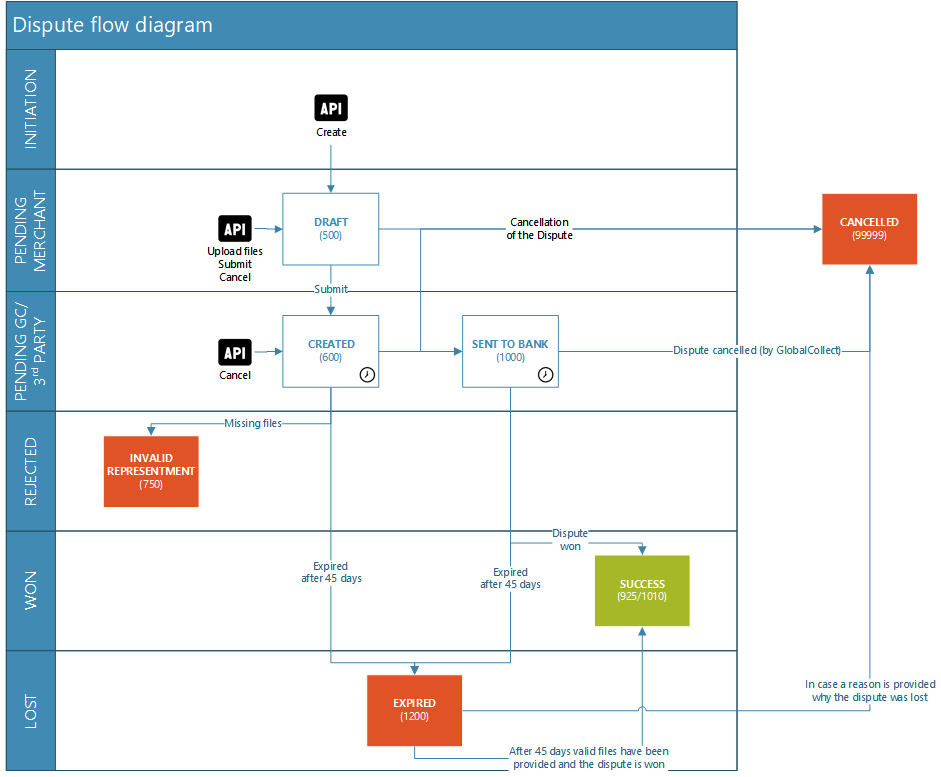
The complete state diagram for disputes can be seen below. In case a dispute reaches INVALID_REPRESENTMENT status, it means that you failed to upload all required evidence to support the dispute request. You are requested to create a new dispute together with the correct files.
Time-frame disputes
From the moment a chargeback has been reported you have 10 calendar days to initiate a dispute. If a Notification of chargeback (NOC_RECEIVED(1400)), the 10 day period starts to count from this status. In case a transaction is charged back without prior notification the 10 day period will start to count from status CHARGED_BACK_BY_CONSUMER (1500).
If you fail to respond to a chargeback on time, the Representment rights will be lost and we cannot defend the chargeback on your behalf.
From the moment a dispute has been processed by our platform, and it has been given status ‘SENT_TO_BANK’, it can take up to 100 days before a resolution is given.