
3D secure version 2
3D Secure version 2 (3DS2) is the enhanced version of the 3D Secure online payment authentication. As opposed to 3DS version 1, where only challenge flows were supported, 3DS version 2 introduces frictionless, risk-based decisions and supports seamless background verification or step-up prompts (via an app, push notification, or biometrics). It collects more data (device, location, behavior) to reduce unnecessary prompts, improves mobile UX, and aims to maintain strong customer authentication (SCA) while preserving conversion.
Key benefits of 3D Secure 2
- Better user experience: frictionless/step-up flows reduce checkout friction, especially on mobile.
- Higher approval rates: risk-based decisions keep more legitimate transactions intact.
- More data for risk assessment: device, location, behavior, and merchant data improve decisions.
- Fewer redirects: in-app or seamless authentication keeps users in flow.
- Stronger security with SCA alignment: supports two-factor-like authentication without heavy disruption.
- Broad device support: works well with mobile wallets and newer devices.
- Flexible exemptions: supports exemptions for low-value, low-risk or recurring payments in the EEA region.
Supported 3D Secure version 2 flows
On our platform, we support multiple scenarios of performing 3D Secure 2, responding to the payment context and conditions.
- Frictionless without Method URL - Frictionless authentication occurs entirely in the background; no user-facing redirect or URL routing.
- Frictionless with Method URL - Frictionless authentication still happens in the background, but a Method URL is used to establish or maintain the authentication context (often for risk signaling or to align with certain issuer networks). The user experience stays seamless, but the flow uses a URL-based handoff behind the scenes.
- Challenge without Method URL - An explicit user-facing challenge is presented without relying on a Method URL handoff (e.g., a visible in-flow prompt via an app or browser).
- Challenge with Method URL - The explicit challenge is delivered with a Method URL handoff involved (URL routing to the issuer’s authenticator, then back to the merchant).
You can find the flow diagrams, test card data, and API examples for these 3D Secure 2 flows in the Test cases section in additional information.
Liability Shift
If both the cardholder and the merchant are participating in the 3D Secure scheme and the transaction has been successfully authenticated, the liability of a chargeback shifts from the merchant to the cardholder's issuing bank. Please note that the liability shift only applies for chargebacks based on a fraud reason code. Any reason codes related to other types disputes are not covered by the liability shift.
Key Benefits
- Enhance trust and confidence for your consumer's online shopping experience
- Additional layer of protection against fraud
- Especially valuable for high transaction amounts
In case of a fraud chargeback reason code, the liability shifts to the card issuing bank if the obtained authentication values were used during the authorization and settlement.
Supported Card Types
| Verified by Visa | Securecode | Amex SafeKey | Protectbuy |
| Visa Credit | Mastercard Credit | Amex Credit | Diners |
| Visa Debit | Mastercard Debit | Amex Commercial | Discover |
| Visa Electron | Maestro | ||
| Visa Commercial | Mastercard Commercial |
Process Flows
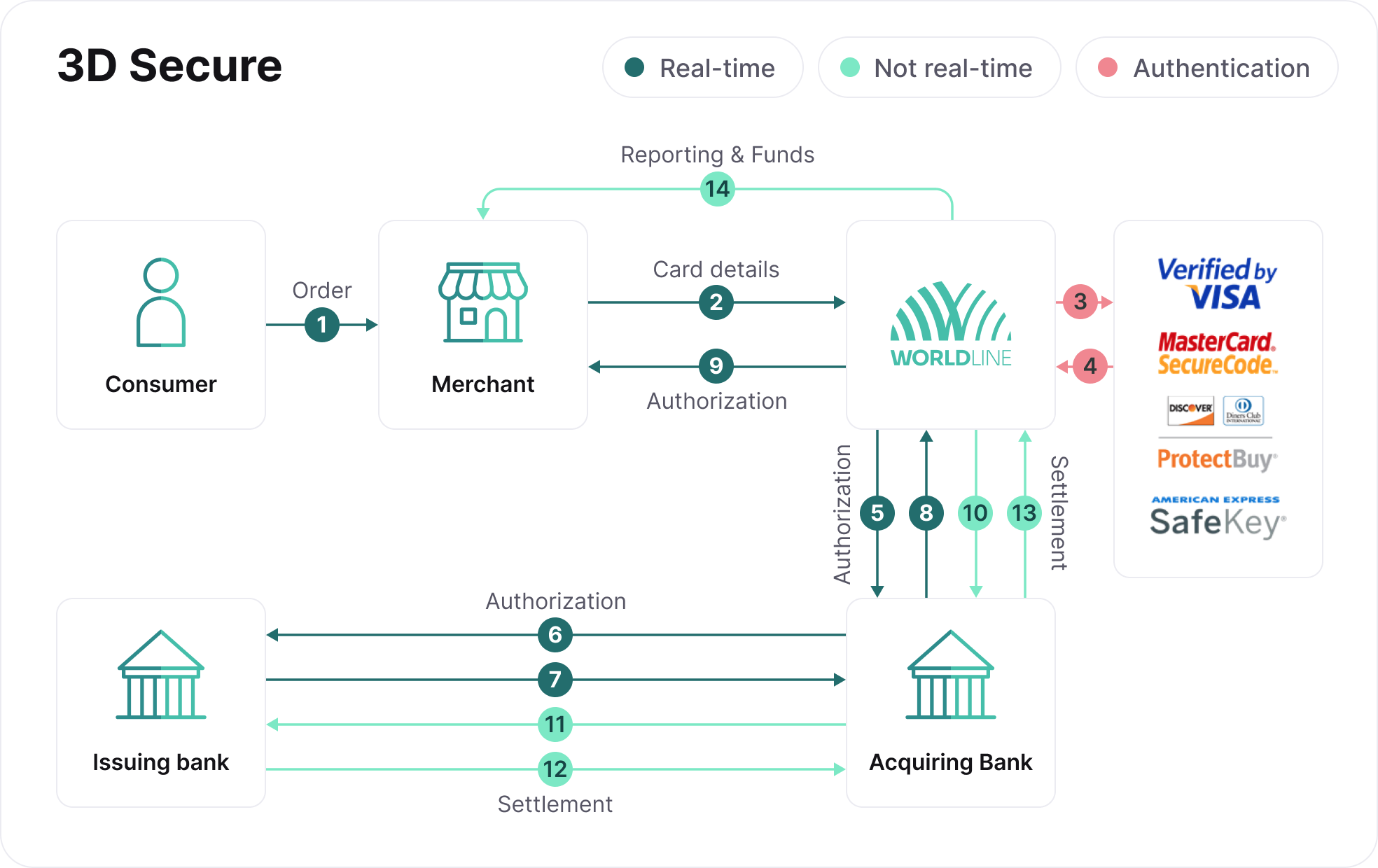
- Consumer places an order.
- You pass the card details to us.
- We send authentication request to card scheme (Verified by Visa, MasterCard SecureCode, Discover/Diners ProtectBuy, or Amex SafeKey).
- Card scheme returns authentication result to us.
- We send authorization request to the acquiring bank.
- Acquiring bank sends authorization request to issuing bank.
- Issuing bank returns authorization result to acquiring bank.
- Acquiring bank returns authorization result to us.
- We return authorization result to you.
- We send settlement request to the acquiring bank.
- Acquiring bank sends settlement request to issuing bank.
- Issuing bank sends settlement funds to acquiring bank.
- Acquiring bank sends settlement funds to us.
- We send reporting and funds to you.
ECI & CAVV
The authentication values provided by the issuer are exchanged in the authorization and settlement messages. It consists of the following elements:
- Electronic Commerce Indicator (ECI): This indicator shows the value of the result of the authentication.
- Cardholder Authentication Verification Value (CAVV): This value is the end-to-end reference generated by the issuer to recognize that the authentication has taken place.
Please be advised that there are scenarios where a Liability Shift applies, even if the transaction was only partially authenticated. An example of such a scenario is you are participating in the authentication, but the cardholder is not participating. Please find more information about these scenarios in below tables.
Additional Information
Liability Shift Protection
Depending on where the card is issued and the level of authentication, liability shift may or may not be applicable. Below tables will help you to determine whether your liability shift is applicable.
Liability Shift: Visa
|
Region & card type
|
Authentication
|
CAVV
|
ECIVisa
|
Description /Scenario
|
Liability Shift
|
Exceptions
|
|---|---|---|---|---|---|---|
| All regions | – | No | 7 | Issuer not participating or cardholder not enrolled | No | |
| Full | Yes | 5 | Authentication successful | Yes |
|
|
| Full | No | 5 | Authentication successful but no CAVV provided by the issuer | No |
||
| Attempt | Yes | 6 | Issuer not participating or cardholder not enrolled CAVV is provided in the authorization |
No (with 3DS V1) Yes (with 3DS V2) |
|
|
| Attempt | Yes | 6 | CAVV is provided by Visa Attempts Service because Issuer's ACS is not available | Yes |
|
|
| Attempt | No | 6 | Authentication attempt but no CAVV provided by issuer or Visa | No |
||
| Unable | No | 7 | Issuer is unable to authenticate, issuer did not respond | No | ||
| Failed | No | Empty | Authentication failed (status 180) | No |
Liability Shift and COF Transactions
|
COF Transaction
|
Description/Scenario
|
Liability Shift
|
|---|---|---|
| First Recurring | When consumer is present, the transaction can be authenticated | Liability applies according to the matrix above |
| Subsequent Recurring | Merchant Initiated Transaction | No liability shift applies |
| First UCOF | When consumer is present, the transaction can be authenticated | Liability applies according to the matrix above |
| UCOF Subsequent CIT | When consumer is present, the transaction can be authenticated | Liability applies according to the matrix above |
| UCOF Subsequent MIT | Merchant Initiated Transaction | No liability shift applies |
Liability Shift: Mastercard / Maestro
|
Region & card type
|
Authentication
|
AAV
|
ECIMC
|
Description /Scenario
|
Liability Shift
|
|---|---|---|---|---|---|
| All regions—consumer cards | – | – | 0 or empty | Issuer not participating or cardholder not enrolled. | No |
| Full | Yes | 2 | Authentication successful | Yes | |
| Full | No | 2 | Authentication successful but no AAV provided by issuer | No | |
| Attempt | Yes | 1 | Issuer not participating or cardholder not enrolled AAV is provided in the authorization |
Yes | |
| Attempt | No | 1 | Authentication attempt but no AAV provided by issuer | Yes | |
| Unable | No | – | Issuer is unable to authenticate | No | |
| Failed | No | – | Authentication failed(status 180) | No |
Liability Shift: Amex
|
Region & card type
|
Authentication
|
AEVV
|
ECIMC
|
Description /Scenario
|
Liability Shift
|
|---|---|---|---|---|---|
| All regions | – | No | 7/Empty | Issuer, card range, or cardholder not enrolled. | No |
| Full | Yes | 5 | Authentication successful | Yes | |
| Full | No | 5 | Authentication successful but no CAVV provided by issuer | No | |
| Attempt | Yes | 6 | Cardholder not enrolled CAVV is provided in the authorization |
Yes | |
| Attempt | No | 6 | Authentication attempt but no CAVV provided by issuer | No | |
| Unable | No | 7 | Issuer is unable to authenticate, issuer did not respond | No | |
| Failed | No | Empty | Authentication failed(status 180) | No |
Liability Shift: Diners & Discover
Liability shift applies in the following scenarios:
- The Issuer, Merchant/Acquirer, and Card Member are enrolled in ProtectBuy and the authentication response is either Full Authentication or Attempts Authentication.
- Only the Issuer and Merchant/Acquirer are enrolled in ProtectBuy and the Card Member is not participating. This includes when a Card Member opts-out of Activation During Shopping (ADS) or ADS is not offered. Liability shift occurs when the authentication response is Attempts Authentication.
- The Issuer and Merchant/Acquirer are both participating but the Issuer's Access Control Server (ACS) is unreachable, requiring the DCI Attempts ACS to perform stand-in authentication, and the authentication response is Attempts Authentication. This may occur whether or not the Card Member is enrolled.
Chargeback Reason Codes
Visa
| Reason code | Chargeback conditions |
|---|---|
| 75 | The cardholder states that he does not recognize the transaction. |
| 83 | The transaction was processed without the permission of the cardholder, or a fictitious card account number was used and the transaction was not authorized. |
Mastercard
| Reason code | Chargeback conditions |
|---|---|
| 37 | The cardholder states that he did not participate in the transaction, or that he did not perform the transaction. |
| 63 | The cardholder states that he does not recognize the transaction. Or the cardholder insists that he did not authorize the transaction. |
Maestro
| Reason code | Chargeback conditions |
|---|---|
| 22 | The cardholder states that he did not initiate the transaction himself. |
Diners
| Reason code | Chargeback conditions |
|---|---|
| C42 | Card member did not authorize or participate in a card not present transaction - OR - any fraudulent charge where the Card is not present and the authorization data indicated that the Card was present. |