

Process flows
In order to integrate PicPay, please refer to our API Reference.
Transaction states
- CREATED – initial state of a transaction. If a transaction remains in this state, it indicates a problem.
- PENDING PAYMENT– the consumer was redirected to the payment gateway, but no return information has been received yet. The status changes once the consumer completes the payment.
- CAPTURED – the transaction was completed successfully, and we have received confirmation that the funds are on their way.
- PAID – we have collected the funds and will begin the remittance process to you.
- CANCELLED – the payment was canceled by either you or the consumer. This is the final state.
- REFUND REQUESTED – the payment refund was requested by the consumer.
- REFUND PENDING – the transaction is awaiting your approval for refund.
- REFUNDED – this is a final state indicating the funds have been refunded to the consumer.
Payment flow
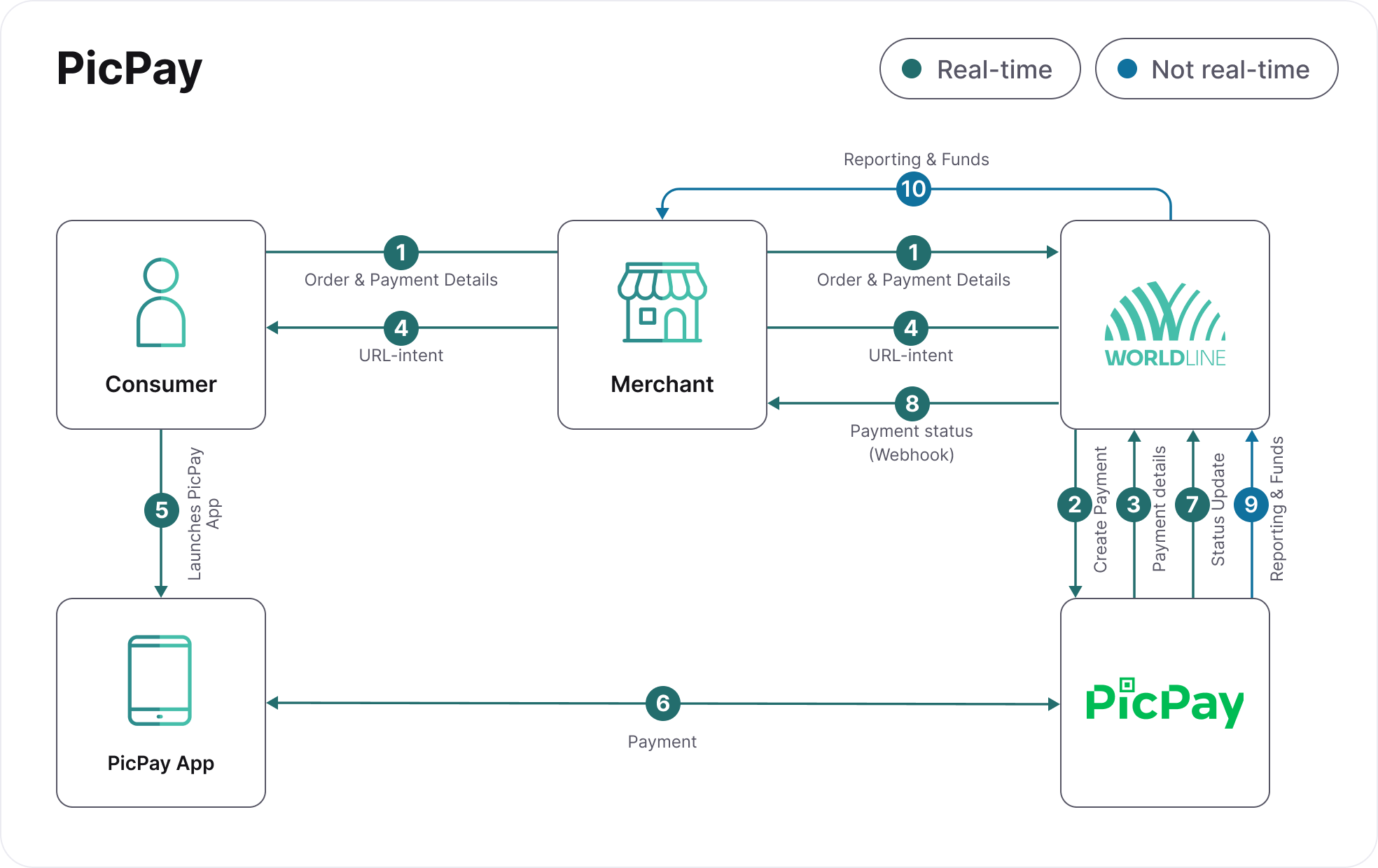
- The consumer places an order and selects PicPay as the payment option.
- Worldline sends the payment request to PicPay.
- Worldline receives the payment response from PicPay.
- The PicPay partner sends us a notification that the payment was completed and the consumer is redirected to the returnURL sent on the payment request.
- The consumer opens their PicPay app and scans the QR code to complete the payment in the app.
- The payment is processed.
- PicPay sends us a notification with the confirmation and the consumer will be redirected to the returnURL sent on the payment request.
- Worldline sends you the confirmation received from PicPay.
- Once the payment is with status CAPTURED, you can release the product to the consumer.
- Funds will be available within 6 days, and reporting will be provided the next day, ensuring a clear and reliable process for your needs.