

Process flows
In order to integrate cards, please refer to our API Reference.
State transition diagrams
The diagram below represents general transaction behavior broken into a number of defined states following the logic payments flow when processed with our platform. This is a definition of general expected behavior only – live processing may vary under some circumstances.
Transaction states
- CREATED – initial state of a transaction. If a transaction remains in this state, it indicates a problem.
- REDIRECTED – we have provided the redirect details and are waiting for the consumer to complete the payment. If this state persists, it means we haven't retrieved the final status from the bank yet. Successful payments will resolve automatically.
- PENDING APPROVAL – the transaction is awaiting your approval to capture the funds. This applies to transactions requiring manual merchant approval before processing.
- CAPTURED – the transaction was completed successfully, and we have received confirmation that the funds are on their way.
- PAID – we have collected the funds and will begin the remittance process to you.
- CHARGEBACKED – the payment was disputed by a consumer and reversed. This is a final state indicating the funds have been returned to the consumer.
- REJECTED – the transaction was rejected by either us or the bank. This is the final state.
- CANCELLED – the transaction was canceled by either you or the consumer. This is the final state.
- REJECTED CAPTURE – the capture request was rejected by us or the acquiring bank. This is a final state for the capture attempt.
Account validation
In case you perform an account validation on card, by using a zero amount in your transaction the flow diagram is much simpler than the one above. The only complexity here is that you could also include an authentication using 3D Secure.
Account validation transaction state
2-step 3D Secure
In case your account has been configured for 2-step 3D Secure there is an additional completion step that needs to be performed. The difference to the generic cards state transition diagram can be seen below.
2-step 3D secure transaction state
Payment flow
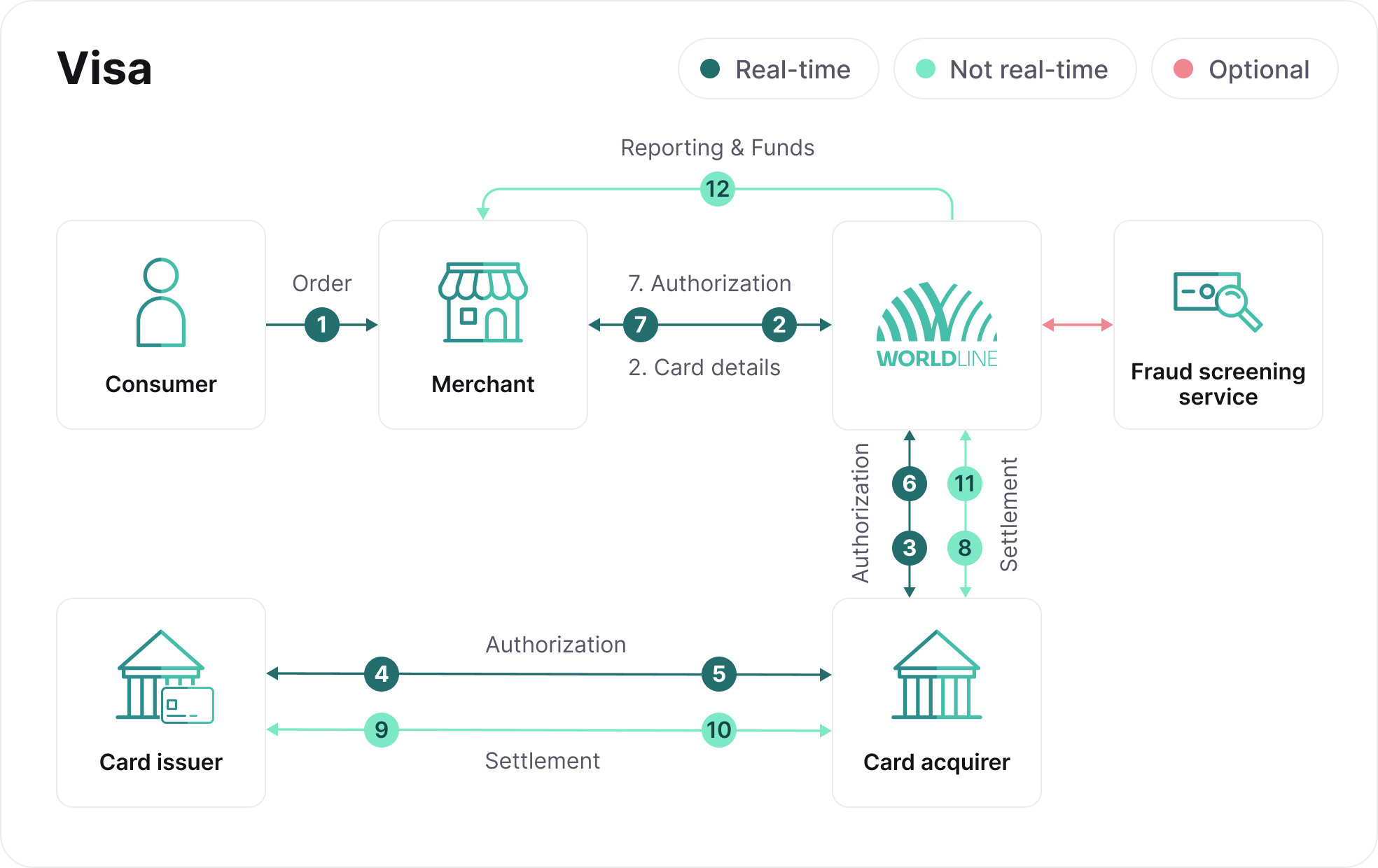
- The consumer selects a card payment product and makes a transaction with you.
- Your server sends the authorization request to us containing the card payment details of the consumer and your reference ID.
- We redirect the authorization request to the relevant acquiring channel.
- The acquirer redirects the authorization request to the card issuing bank.
- The card issuing bank processes the transaction in real-time, returning an authorization or decline response.
- The acquirer sends the authorization result to us.
- We return the request response result to you - If the request is authorized, you can choose to release the product or service to the consumer.
- We will also, automatically or after a request for capture, send the settlement file to the acquirer to facilitate collection of a successfully authorized transaction.
- The acquirer sends the settlement request, via the card scheme, to the card issuing bank and the consumer‘s account will be debited accordingly.
- The card issuing bank transfers, via the card scheme, the funds to the acquirer.
- The acquirer transfers the funds to our bank account where the confirmation of funds is registered.
- You will then receive the funds and a payment report which will include your payment reference – This enables you to update the relevant orders based on the information contained in the report.
During the transaction process the payment status is updated each time a request or response is received and the changes are reported to your system.
Next Testing