
Batch Account Updater
When you use Worldline Tokenization Service, you can subscribe to Account Updater to keep the card details stored in your tokens current. Here's how it works:
- Every week, we automatically identify tokens of cards which are expired, lost, stolen, or nearing the expiry date.
- We send these cards to Visa and Mastercard to request updated information.
- When the card schemes return new details, we update your tokens immediately with the latest card data.
This process runs automatically without disrupting your billing cycles or requiring you to contact consumers. Your payment tokens remain valid and current, reducing failed transactions due to outdated card information. Account updates feature is supported by Visa and Mastercard schemes.
You can use Account Updater if you meet any of the following:
- You use Worldline Tokenization Service.
- You store consumer credentials for payments, such as recurring or subscription-based billing models.
- You need to maintain card lifecycle management and keep card details current.
Token update process flow
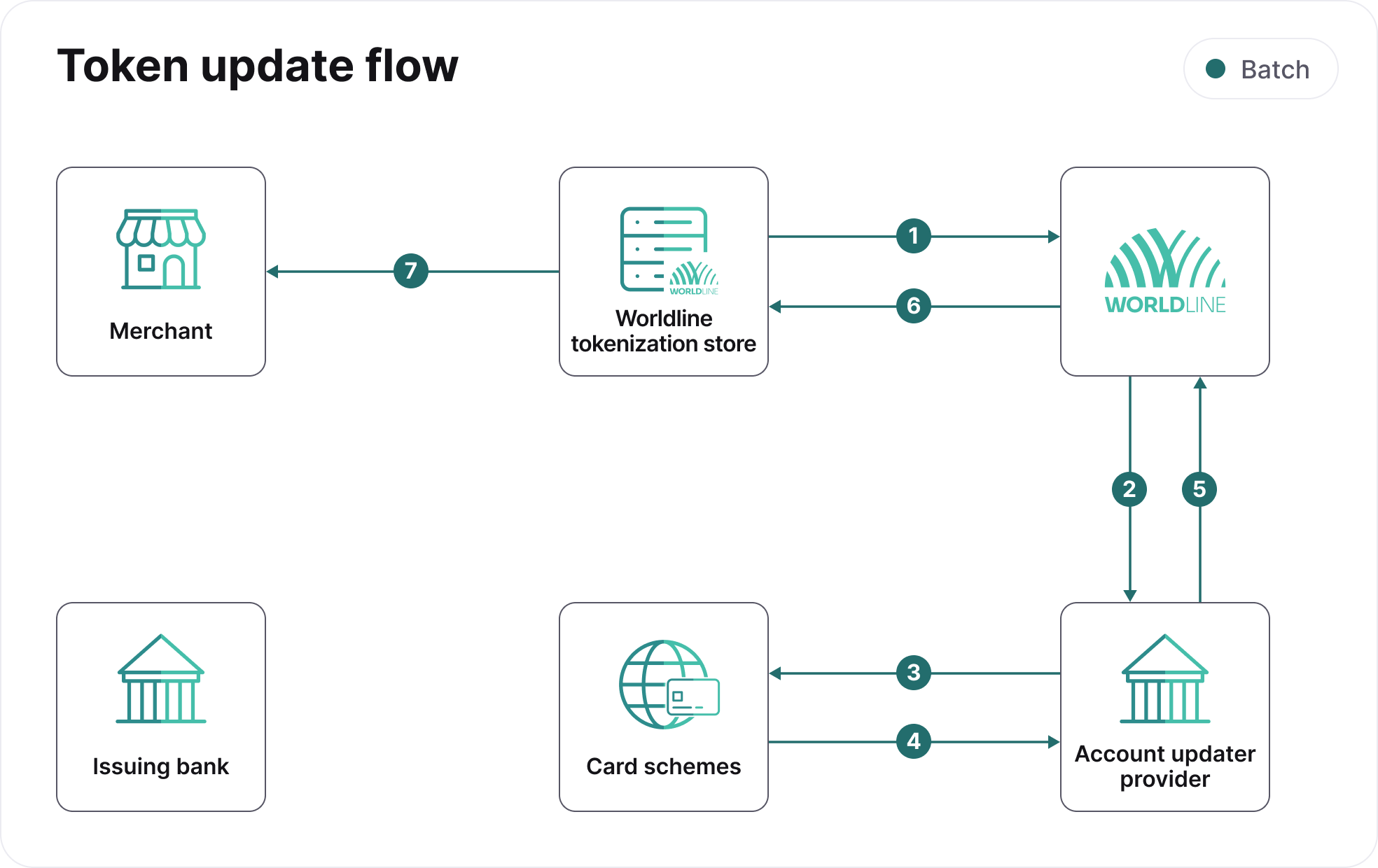
- Payment engine monitors the system for card numbers that are about to expire or have already expired.
- After finding expired card numbers, we create a batch file and send a request to our account updater provider.
- The account updater requestor submits the transaction details to the card schemes.
- The card schemes provide the updated account details including the reason for change and send the response file to the account updater requestor.
- The account updater requestor sends us the updated information in a response file.
- We update the records with the new information. The updated details will be used for processing all new transactions until another update is made to the token.
- We inform you of the token update via webhooks.
Types of updates
The following table shows the different types of update and the Action that we recommend to take for each specific type:
| Type of update | Action |
|---|---|
| New card number, New card expiry date, Both card number and expiry date changed | The token storing the card details is updated automatically with new card information. Continue processing payment using the same token which is updated with new card information. |
| Both card number and expiry date remains the same | Token is not updated. Continue processing payment using the same token. |
| Account closure | Deactivate the token. Stop processing payment with the deactivated token, and contact the cardholder for more information before attempting to re-bill. |
| Account not found | Token is not updated. Continue processing payment using the same token. |
Issuer portfolio conversions are not supported.