
Multiple partial captures
Overview
The multiple partial captures feature enables you to request a partial capture linked to an authorization multiple times. It allows incremental settlements over time while ensuring the total captures never exceed the authorized amount. This feature is primarily used in travel (airlines, lodging, OTAs) and retail, where goods and services can be shipped or delivered in several batches, with each shipment triggering a partial capture (for example, split delivery of goods or split capture for ticket bookings). Without it, you must wait until all goods and services are delivered before capturing the total authorized amount, which can significantly impact cash flow.
Key benefits
- Improved cash flow: You can match funding to the actual delivery or service milestones, improving cash flow.
- Increased trust: Consumers only see charges on their bank statement for items that have actually shipped. This reduces support inquiries from consumers about order status.
- Lower rejection rates: You can authorize a large amount upfront and capture smaller portions over time, retaining the ability to capture the remaining amount within the authorization window (subject to card network rules and issuer policies). Avoid the need for new authorizations (and potential declines) for every partial shipment.
- Reduced transaction cost: Minimize interchange fees associated with multiple separate authorizations and the administrative overhead of manual refunds.
- Reduced dispute & risk: Gradual charges that match delivery reduce chargebacks and refunds by aligning charges with delivered value.
- In Airlines & hospitality industry, charging consumers often happens based on the services rendered. Partial captures allow charging as the consumer uses the service.
Boarding
To start your boarding process and enable this feature, please reach out to your Account Manager or Customer Success Manager.
Status flows for multiple partial captures
Each payment that supports multiple partial captures represents a single authorization. Multiple partial captures payments display differently than non-multiple partial captures payments in the payment flows. A multiple partial captures payment can include one or more captures, and each capture has its own status flow.
MPC Payment states
- CREATED – initial state of a transaction. If a transaction remains in this state, it indicates a problem.
- REDIRECTED – we have provided the redirect details and are waiting for the consumer to complete the payment. If this state persists, it means we haven't retrieved the final status from the bank yet. Successful payments will resolve automatically.
- CAPTURED – the transaction was completed successfully, and we have received confirmation that the funds are on their way.
- PAID – we have collected the funds and will begin the remittance process to you.
- REJECTED – the transaction was rejected by either us or the bank. This is the final state.
- CANCELLED – the payment was canceled by Alipay+. Cancellation can only happen on the Alipay+ side.
- REFUNDED – state indicates that the transaction has been successfully reversed, and the funds have been returned to the consumer.
Integration
Use the Request Builder in the API Explorer to test and validate API requests before integrating them into your application. Log into your Configuration Center account and select the merchant IDs linked to your account to begin.
Get payment product information
{
GET https://{domainname}/v1/{merchantId}/products/{paymentProductId}
   }
When sending a get payment product API call, in the response, a code with payment product information appears. A part of this is a new field allowsMultiplePartialCaptures
{
  "deviceFingerprintEnabled": false,
  "allowsClickToPay": false,
  "allowsInstallments": false,
  "allowsMultiplePartialCaptures": true,
  "allowsRecurring": true,
  "allowsTokenization": true,
  "authenticationIndicator": {
    "name": "AUTHENTICATIONINDICATOR",
    "value": "1"
}
Authorization information
{
  "cardPaymentMethodSpecificInput": {
    "threeDSecure": {
      "challengeIndicator": "challenge-requested",
      "challengeCanvasSize": "full-screen",
      "skipAuthentication": true,
      "redirectionData": {
        "returnUrl": "https://example.org/return"
      }
    },
    "paymentProductId": 1,
    "authorizationMode": "PRE_AUTHORIZATION",
    "card": {
      "cardNumber": "4012001037141112",
      "expiryDate": "1227",
      "cardholderName": "John Doe",
      "cvv": "212"
    }
  },
  "order": {
    "amountOfMoney": {
      "amount": 10000,
      "currencyCode": "EUR"
    },
    "customer": {
      "billingAddress": {
        "countryCode": "NL"
      }
    }
  }
}
{
  "creationOutput": {
    "additionalReference": "00001966100000000030",
    "externalReference": "000019661000000000300000100001"
  },
  "payment": {
    "id": "000019661000000000300000100001",
    "paymentOutput": {
      "amountOfMoney": {
        "amount": 10000,
        "currencyCode": "EUR"
      },
      "references": {
        "paymentReference": "0"
      },
      "paymentMethod": "card",
      "cardPaymentMethodSpecificOutput": {
        "paymentProductId": 1,
        "authorisationCode": "023483",
        "fraudResults": {
          "fraudServiceResult": "no-advice",
          "avsResult": "E",
          "cvvResult": "P"
        },
        "card": {
          "cardNumber": "************1112",
          "cardholderName": "John Smith",
          "expiryDate": "1227"
        }
      }
    },
    "status": "PENDING_CAPTURE",
    "statusOutput": {
      "isCancellable": true,
      "isRetriable": false,
      "statusCategory": "PENDING_MERCHANT",
      "statusCode": 610,
      "statusCodeChangeDateTime": "20250923144003",
      "isAuthorized": true,
      "isRefundable": false
    }
  }
}
{
  "cardPaymentMethodSpecificInput": {
    "authorizationMode": "PRE_AUTHORIZATION"
  },
  "order": {
    "amountOfMoney": {
      "amount": 100,
      "currencyCode": "EUR"
    },
    "customer": {
      "contactDetails": {
        "emailAddress": "ankit.srivastava@worldline.com"
      },
      "merchantCustomerId": "11011011",
      "billingAddress": {
        "countryCode": "NL"
      }
    }
  }
}
Capture information
To get an information on a capture which is not in its final state, send a request with a isFinal: false field.
{
  "isFinal": false,
    "amount": 20
  }
In the response you will get id which represents CaptureId which is a reference of the capture. It should be stored for future operations on this capture.
{
  "id": "000000999110000027640000100001C00001",
  "captureOutput": {
    "amountOfMoney": {
      "amount": 20,
      "currencyCode": "EUR"
    },
    "references": {
      "paymentReference": "0",
      "providerId": "3502",
      "providerReference": "000000999110000027640000100001"
    },
    "paymentMethod": "card"
  },
  "status": "CAPTURE_REQUESTED",
  "statusOutput": {
    "isFinal": false,
    "isRefundable": true,
    "isRetriable": false,
    "statusCodeChangeDateTime": "20260114134203"
  }
}
With isFinal= true the capture will be treated as last capture and the Payment order will move to final state of 910. This means that no more capture payment will be allowed on this payment order.
{
  "isFinal": true,
    "amount": 20
  }
{
GET https://{domainname}/v1/{merchantId}/captures/{captureId}
  }
{
  "id": "000000999110000027680000100001C00001",
  "captureOutput": {
    "amountOfMoney": {
      "amount": 4,
      "currencyCode": "EUR"
    },
    "references": {
      "paymentReference": "0",
      "providerId": "3502",
      "providerReference": "000000999110000027680000100001"
    },
    "paymentMethod": "card"
  },
  "status": "PAID",
  "statusOutput": {
    "isFinal": false,
    "isRefundable": true,
    "isRetriable": false,
    "statusCodeChangeDateTime": "20260122155521"
  }
}
GET https://{domainname}/v1/{merchantId}/payments/{paymentId}/captures}
{POST https://{domainname}/v1/{merchantId}/payments/{paymentId}/cancel}
Refund
{POST https://{domainname}/v1/{merchantId}/payments/{paymentId}/refund}
POST https://{domainname}/v1/{merchantId}/captures/{captureId}/refund}
Webhooks
Webhooks are highly recommended to use to keep your order/payment state in sync (e.g., capture status, refunds, voids) and to handle asynchronous events reliably. To enable webhook events for captures, first make sure you have webhooks reporting enabled. You can enable webhooks in the Configuration Center.
Once webhooks are enabled, you'll receive webhook events when a capture request is processed. When a capture request is processed, we send you a webhook event with the following details:
| Event | Description |
|---|---|
| capture.created | The transaction has been created. This is the initial state once the new capture is created. |
| capture.rejected | We or one of our downstream acquirers/providers have rejected the capture request. |
| capture.cancelled | The capture request has been cancelled. |
| capture.captured | The capture has been captured and we have received the online confirmation. |
| capture.paid | We have matched the incoming funds with the capture. |
| capture.chargebacked | The capture has been chargebacked. |
| capture.chargeback_notification | We received a notification of a chargeback and this status informs you that your account will be debited for this particular capture. |
| capture.requested | The capture has been requested. We haven't received an online confirmation yet. |
| payment.completed | The transaction has been completed, this is the final state. No additional actions are possible, except for refunds. |
| payment.capture_in_progress | The first capture of the payment has been received. At this state, you can initiate a refund for the already captured amount and any additional captures. |
To check other webhooks, you can see our webhook event types list.
Testing
If you want to test multiple partial captures in our pre-production environment, please reach out to your Account Manager or Customer Support team get you pre-production MID enabled for the multiple partial captures feature.
Once your MID is enabled, you can test multiple partial captures using payment products and test cards listed below:
- Visa Online (Payment product ID: 1),
- Mastercard Online (Payment product ID: 3),
- Apple Pay-Visa (Payment product ID: 302),
- Apple Pay-Mastercard (Payment product ID: 303),
- Diners Club (Payment product ID: 132),
- Discover (Payment product ID: 128),
- Google Pay - Visa (Payment product ID: 320),
- Google Pay - Mastercard (Payment product ID: 321).
Testing authorization and captures
- Follow the integration section API examples to create an authorization. Then submit multiple partial capture requests. If the full authorized amount is not captured, the system automatically reverses the remaining uncaptured amount after you send the final capture with the isFinal flag set to true.
- If you do not send the isFinal flag and submit capture requests that total the full authorized amount, the system automatically marks the payment as CAPTURE FINAL.
Testing refunds
- You can submit refunds at the payment level or the capture level.
- When you refund a transaction at the capture level, the Insights reporting platform and merchant reports display the captureId and paymentId.
- You can submit refunds after the first capture is processed. The refund amount cannot exceed the total captured amount at that time. Refund requests exceeding the total captured amount are rejected.
- You can trigger refunds from Insights at the payment level or the capture level.
Testing cards details
| Scheme | PPID | CC Number | CVV/CAVV | Expiry Date |
|---|---|---|---|---|
| Visa | 1 | 4012001037141112 | 840 | 12/27 |
| Visa with 3DS | 1 | 44977830259535756 | 123 | 12/27 |
| Mastercard | 3 | 5204730000001003 | 100 | 12/35 |
| Visa with external 3DS | 1 | 4012001037141112 | 212 / YwAAAWYC5vGnU+4AmYxdgm5QUUA= | 12/27 |
| Mastercard with external 3D | 3 | 5204730000001003 | 123 / kANnMdSX47pGwDsg15UKaJeB6eJl | 12/35 |
| Apple Pay-Visa | 302 | 4761739001010010 | YwAAAB4EEI0Vn70BcjyTgFhgAgA= | 12/27 |
| Apple Pay-Mastercard | 303 | 5204730000001003 | YwAAAB4EEI0Vn70BcjyTgFhgAgA= | 12/35 |
| Google Pay-Visa | 320 | 4761739001010010 | YwAAAB4EEI0Vn70BcjyTgFhgAgA= | 12/27 |
| Google Pay-Mastercard | 321 | 5204730000001003 | YwAAAB4EEI0Vn70BcjyTgFhgAgA= | 12/35 |
| Diners | 132 | 36259600500102 | 397 | 0728 |
| Discover | 128 | 6011492100005191 | 456 | 0728 |
Reporting
Insights
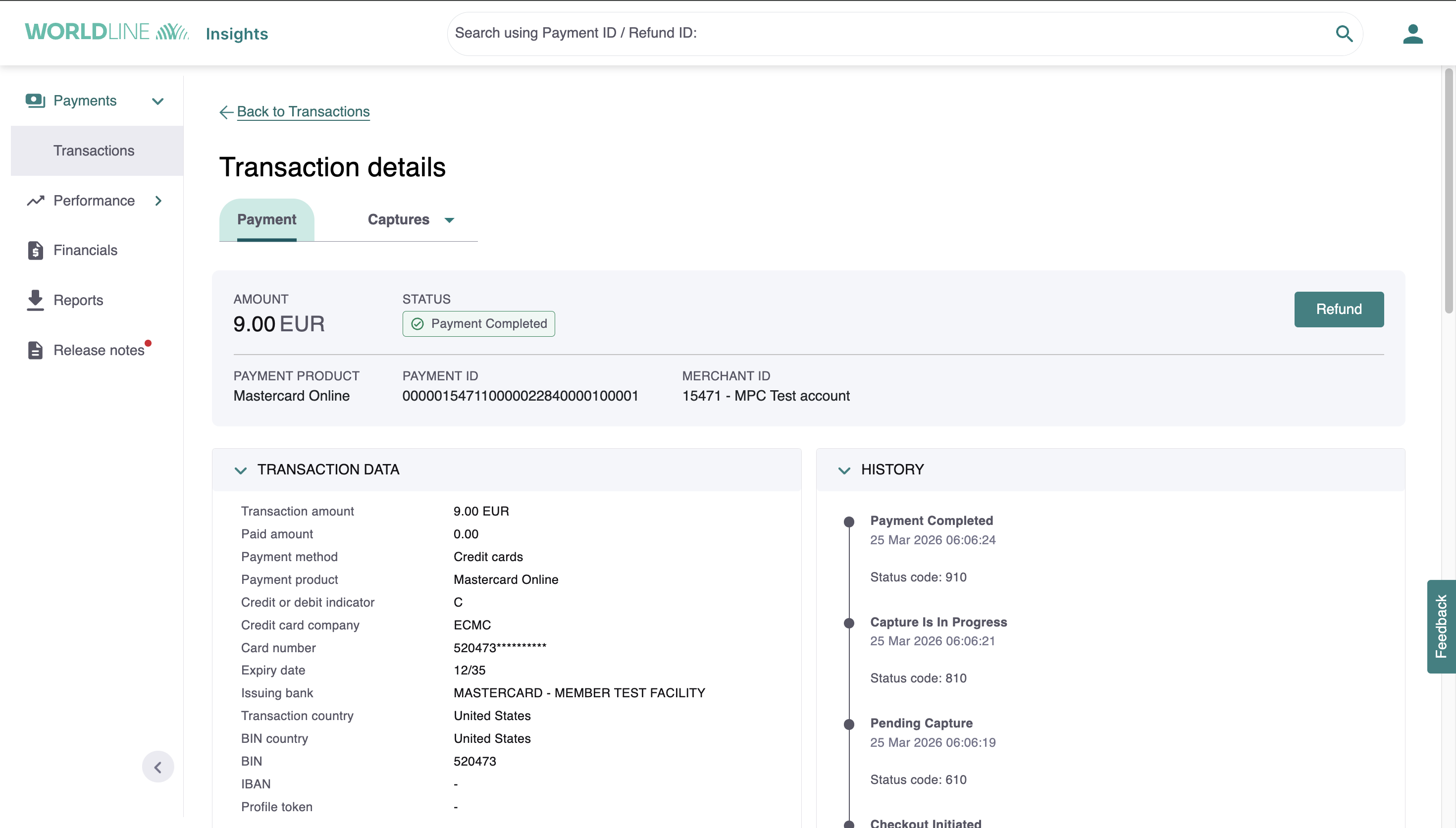
To view the capture status for a specific transaction, go to the "Transactions" menu on the left side. Select the "Add Filters" button and choose a capture status code from the menu on the right. There are three possible status codes:
- 610 - pending capture (no capture has come in yet)
- 810 - capture is in progress (at least 1 capture has been initiated)
- 910 - all captures possible on this transaction are completed
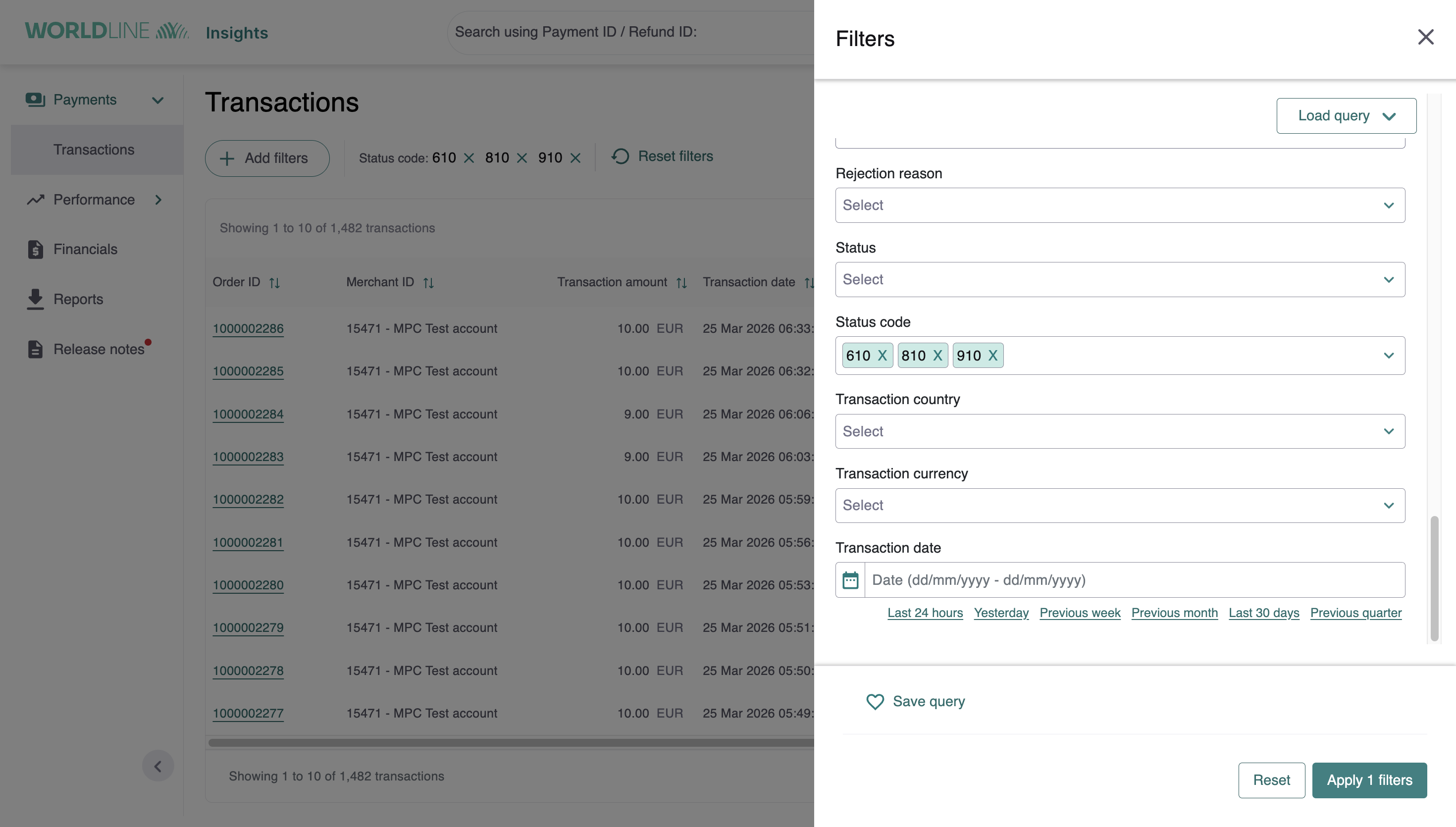
Once you select a status code, the capture history appears on the right side.
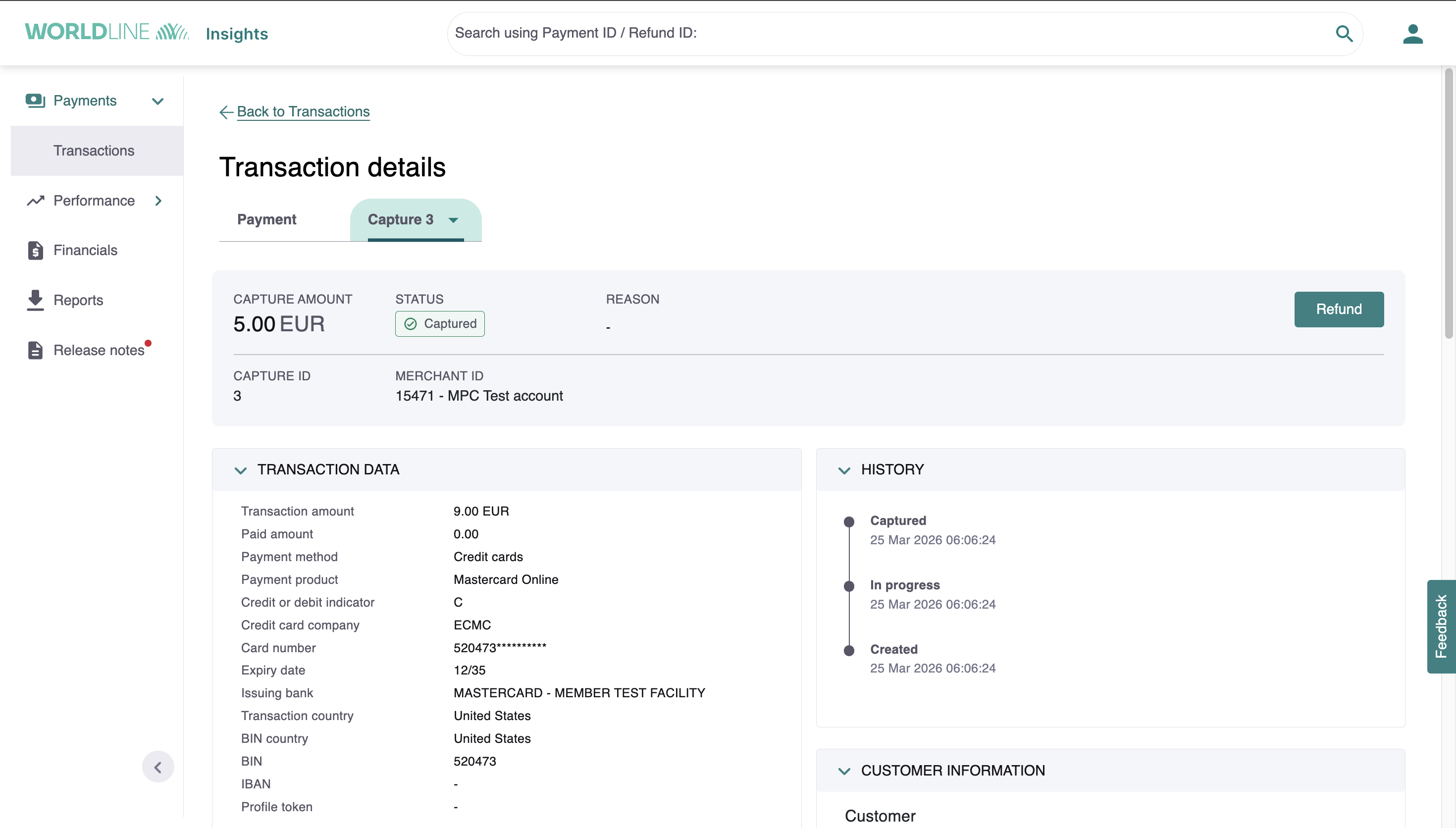
Check the status of your payment
Once you create a payment, you can initiate a capture and check its status.
- Go to "Transactions" section in the menu and click on the payment that you want to check the status for. After creating the payment, the transaction have a "Pending capture" status.
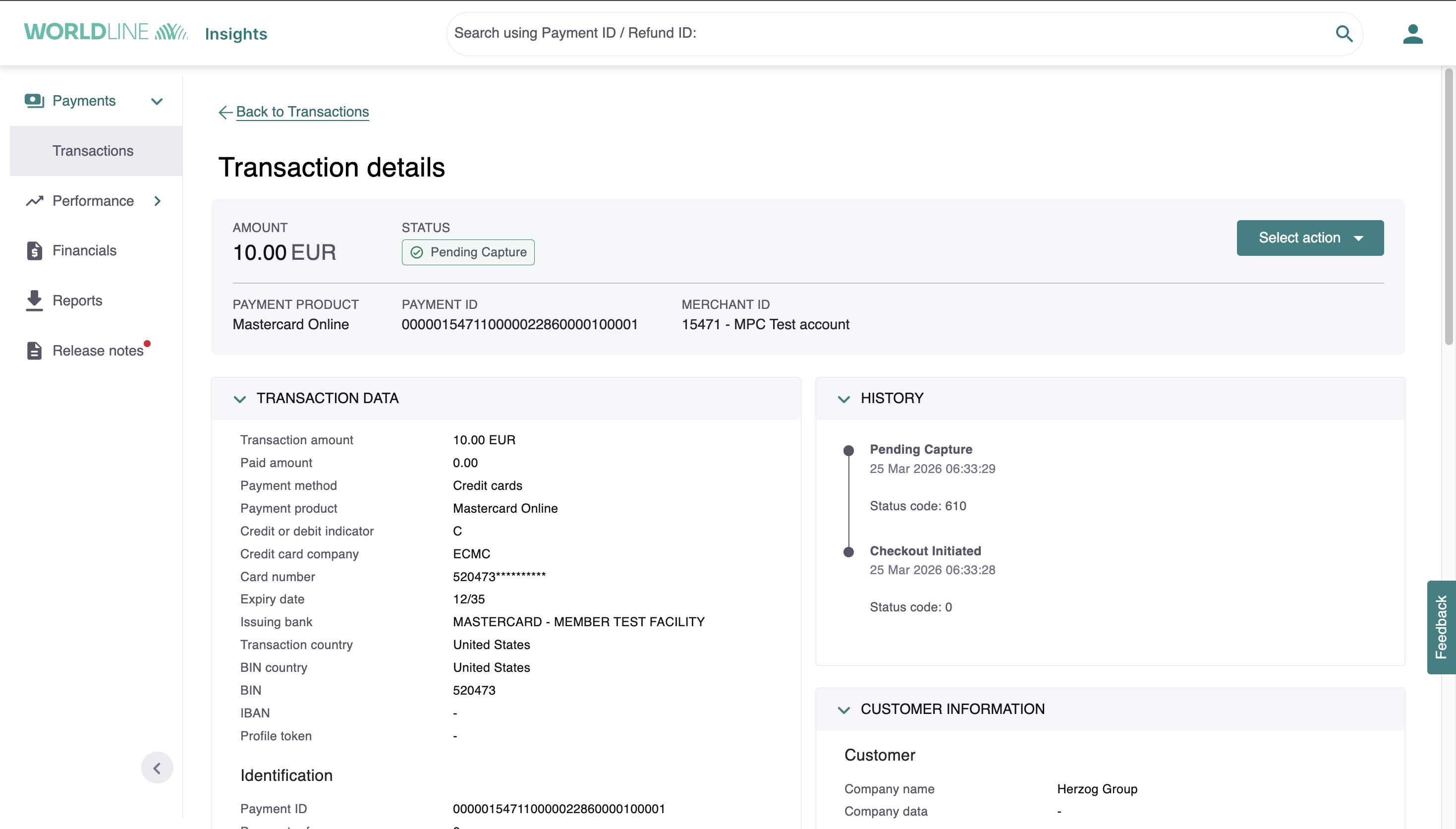
- When you initiate the 1st capture, the status changes to "Capture in progress". If you want to check the information of this particular capture, click on the "Payment" button and check the capture details.
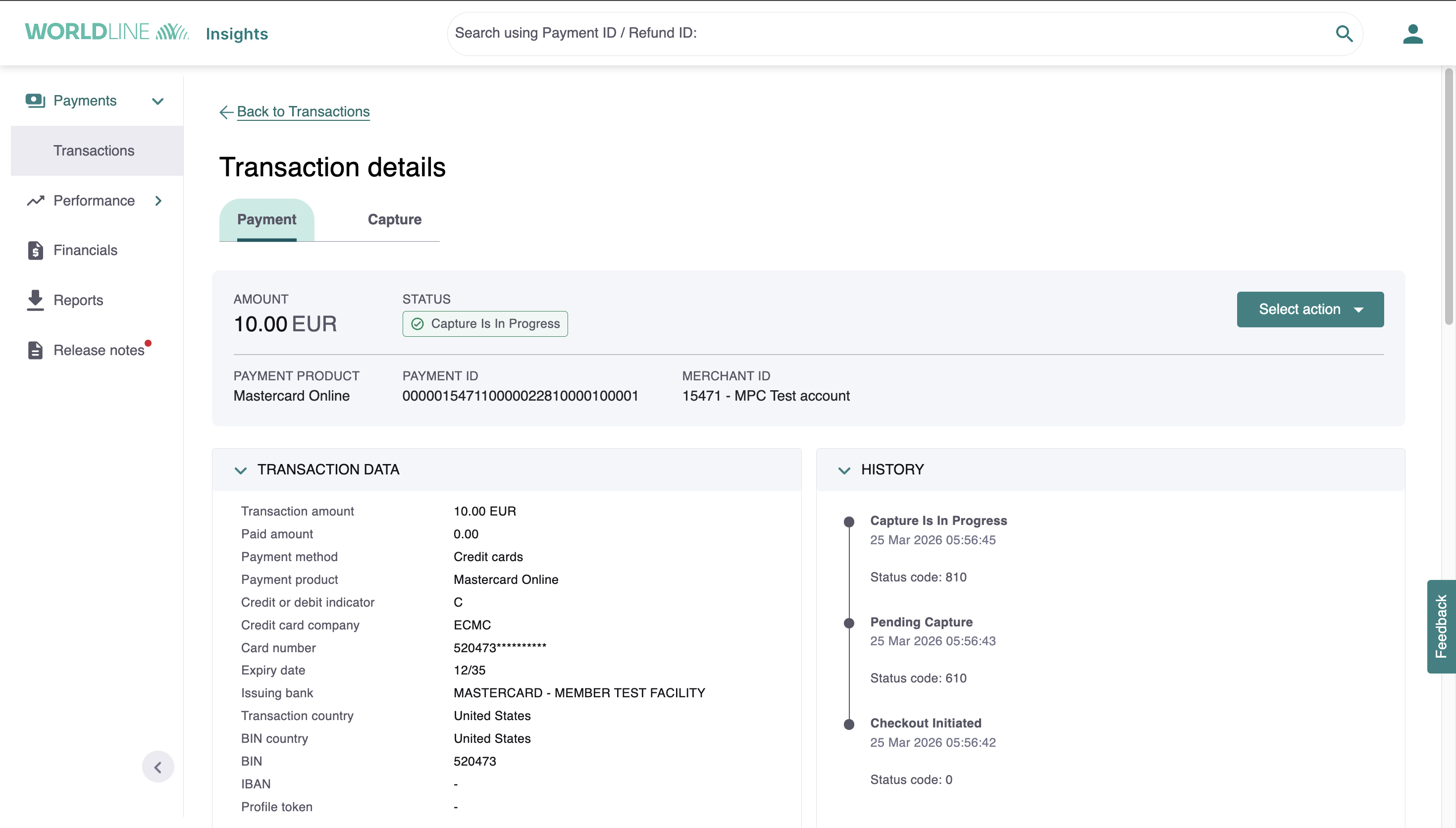
- After the last capture is sent, or the full amount captured, the status moves to "Payment Completed".
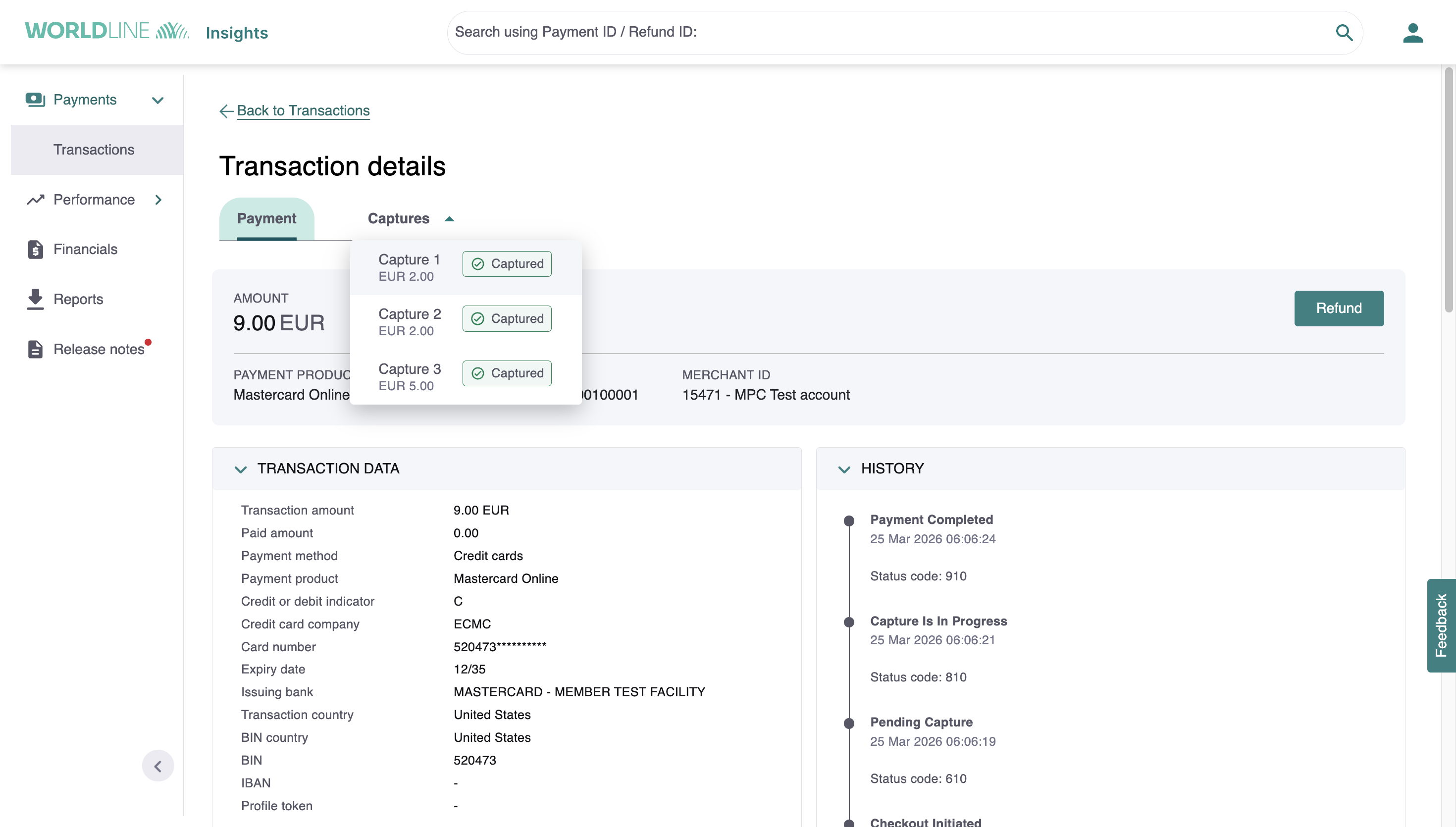
Check capture history
To see details of a specific capture, select it from the "Captures" drop-down menu next to the "Payment" button.
WX reporting
The WX report provides additional Multiple Partial Capture (multiple partial captures) related data fields for every multiple partial captures transaction.
| Fields | Description |
|---|---|
| CaptureID | Reference of the capture returned in the response (New field). |
| FinalCaptureInd | Indicates to Worldline that this capture is the final one for the payment; the authorization can be closed. No further captures can be sent for this payment (New field). |
| CaptureReference | Your unique reference for the capture to reconcile our report files (New field). |
The WX report includes the following three new fields at the positions described below:
WX-XML
- Extend the XSD to include
- CaptureID in DataRecord as type Number (5).
- FinalCaptureInd in DataRecord to PaymentData as type TFIndicator (string: T or F).
- CaptureReference in DataRecord to PaymentData as type String.
WX-CSV
- Field: filler_11 for CaptureID
- Field: filler_12 for FinalCaptureInd
- Field: filler_13 for CaptureReference
WX-ASCII
- Use the filler_1403 field to accomodate the CaptureID and the FinalCaptureInd
- by reducing the size of the filler_1403 from 85 to 79 bytes
- by allocating 5 bytes for CaptureID
- by allocating 1 byte for FinalCaptureInd
- Use the customfield4 to report the CaptureReference
- "X" records appear when a capture reaches settlement in progress or when you receive a chargeback notification.
- "+" records appear when a PaymentId is marked as paid or when a chargeback is withdrawn.
- "-" records appear when a PaymentId is marked as refunded or when a chargeback is confirmed.
FAQ
- Can I have fallback acquirer for MIDs enabled for multiple partial captures?
Yes, you can only have multiple partial captures supported acquirer as a fallback.
- When any existing merchant (MID) gets enabled for Multiple Partial Capture and were earlier using Approve payment API what happens to their payments which are in PENDING_APPROVAL status?
You need to handle this in your API call to Worldline.- When a transaction is in PENDING_APPROVAL status, call the Approve Payment API to proceed.
- When a transaction is in PENDING_CAPTURE status, call the Capture Payment API to complete the transaction.
- Since multiple partial captures can be enabled at Payment product level, what can I do, if I am using both multiple partial captures supported & not supported payment products under same MID?
You need to handle this in your API call to Worldline.
- When a transaction is in PENDING_APPROVAL status, call the Approve Payment API to proceed.
- When a transaction is in PENDING_CAPTURE status, call the Capture Payment API to complete the transaction.
- How can I handle different Authorization types for the same MID which has been enabled for multiple partial captures?
Multiple partial captures feature is only supported when you use PRE_AUTHORIZATION as your authorizationMode. If you submit a payment request with a different authorizationMode (FINAL_AUTHORIZATION or SALE), the payment will be processed as non-multiple partial captures and follows the non-multiple partial captures status flow.- When you use PRE_AUTHORIZATION, transactions follow the multiple partial captures status flow at payment level (0 → 610 → 810 → 910). You must call the Capture Payment API to complete the transaction.
- When you use SALE, transactions follow the non-multiple partial captures status flow.
- When you use FINAL_AUTHORIZATION, transactions follow the non-multiple partial captures flow and require you to call the Approve Payment API.
- At any moment, can I check the remaining uncaptured amount by calling getPayment or getStatus? Basically, can I see the total amount I've authorized and how much remains to be captured?
Yes. There is the "returnOperations" query parameter (defaults to false) in the Get payment API request and "amountCaptureRequested", "amountCaptured", and "operations" in the response body.