
Network tokens
Network tokenization is a process where card networks replace a consumer's PAN (Primary Account Number) with a unique digital identifier called a network token. When a consumer registers their card on a device, or saves it during checkout on your website, the card network automatically generates a network token in real-time. This token is used for transactions instead of the actual card number.
What are network tokens?
Network tokens replace raw card numbers with secure, domain-restricted identifiers issued directly by card networks. Because each token is bound to your specific business, device, or channel, it cannot be used elsewhere if intercepted. Only the card network and issuing bank can decrypt the underlying account data, significantly reducing fraud risk.
When a consumer's card expires or is reissued, the card network automatically updates the token in the background. This allows you to process repeat transactions without disruption or payment declines. Consumer authentication functions the same way as standard card payments, providing strong security without adding checkout friction.
Where are network tokens used?
- Card-on-File transactions: When you store consumer payment details for future transactions, network tokens eliminate the risk of storing sensitive card data. Unlike traditional card-on-file storage, tokens improve authorization rates and reduce fraud-related chargebacks.
- Subscription and recurring payments: When you offer subscription-based services (e.g., streaming platforms, SaaS providers), network tokens ensure uninterrupted payments. Since tokens automatically update when the underlying card changes (e.g., expiration, reissuance), they prevent transaction failures and reduce consumer churn.
- Digital wallets & mobile payments: Digital wallets like Apple Pay and Google Pay use network tokens to securely store and process payments. Transactions are authorized only within the designated wallet and device, preventing use outside the intended environment.
- One-Click checkout: You can use network tokens to enable fast checkout experiences. With tokenized credentials, consumers can complete purchases without repeatedly entering card details, reducing friction in the checkout process.
Key benefits of network tokens
Network tokens provide a multitude of advantages for payment processing:
Higher authorization rates: The issuer is responsible for keeping card data current and becomes part of the risk assessment when the token is created. This increases issuer confidence and eliminates declines due to expired credentials.
Reduced fraud risk: Network tokens replace sensitive card data with unique, domain-restricted tokens that can only be used with a specific business, device, or payment channel. Even if intercepted, a token cannot be used elsewhere. In addition, each tokenized transaction includes a unique cryptogram, which is a one-time cryptographic value that helps verify the authenticity of the transaction and the token being used. This makes it significantly more difficult for fraudsters to reuse stolen payment credentials. As a result, network tokens can reduce fraud-related declines and chargebacks, lowering fraud costs for both you and payment providers.
Improved consumer experience: When a consumer's card expires, is lost, stolen, or replaced, the card network can automatically update the underlying card information associated with the network token. This allows you to continue processing recurring payments and subscriptions without requiring consumers to update their payment details, reducing payment interruptions and providing a smoother checkout experience.
Lower compliance burden: By eliminating the need to store actual card details, you reduce your PCI DSS compliance burden and associated data breach risks.
What we offer
If you already use our tokenization service, we automatically exchange your stored tokens for network tokens during payment processing. This happens in the background with no changes required on your side. By combining stored credentials with network tokenization, you benefit from a more secure and efficient payment setup. Sensitive card data is further removed from your systems, reducing your PCI scope, while network-level optimization helps improve authorization rates. This approach allows you to enhance both security and performance without adding complexity to your integration.
Here's how it works:
We manage the onboarding process with card networks on your behalf. For the initial transaction, we process the payment using the PAN (Primary Account Number) and provision the network token asynchronously. Network tokens are available within 2–3 seconds and apply to all subsequent transactions.
Self-managed network tokens
You can submit network tokens provisioned outside our platform in your payment requests. These tokens are provisioned and managed by you, your orchestration platform, or your subscription partners.
Network tokens are not considered sensitive data because they do not contain raw card numbers or CVV codes. Instead, they act as secure, unique identifiers for the original payment card, giving you greater flexibility and control over payment routing.
When you submit an external network token, include the token PAN (Primary Account Number), token expiry date, and token cryptogram. We forward the payment request to the card networks for authorization and settlement. We do not validate the token details you submit, and no account configuration is required.
Pricing and costs
Network tokenization is enabled for your account at no additional cost. Authorization rates typically improve with network tokens, which can positively impact your transaction approval rates and revenue.
Network tokens and Worldline tokens
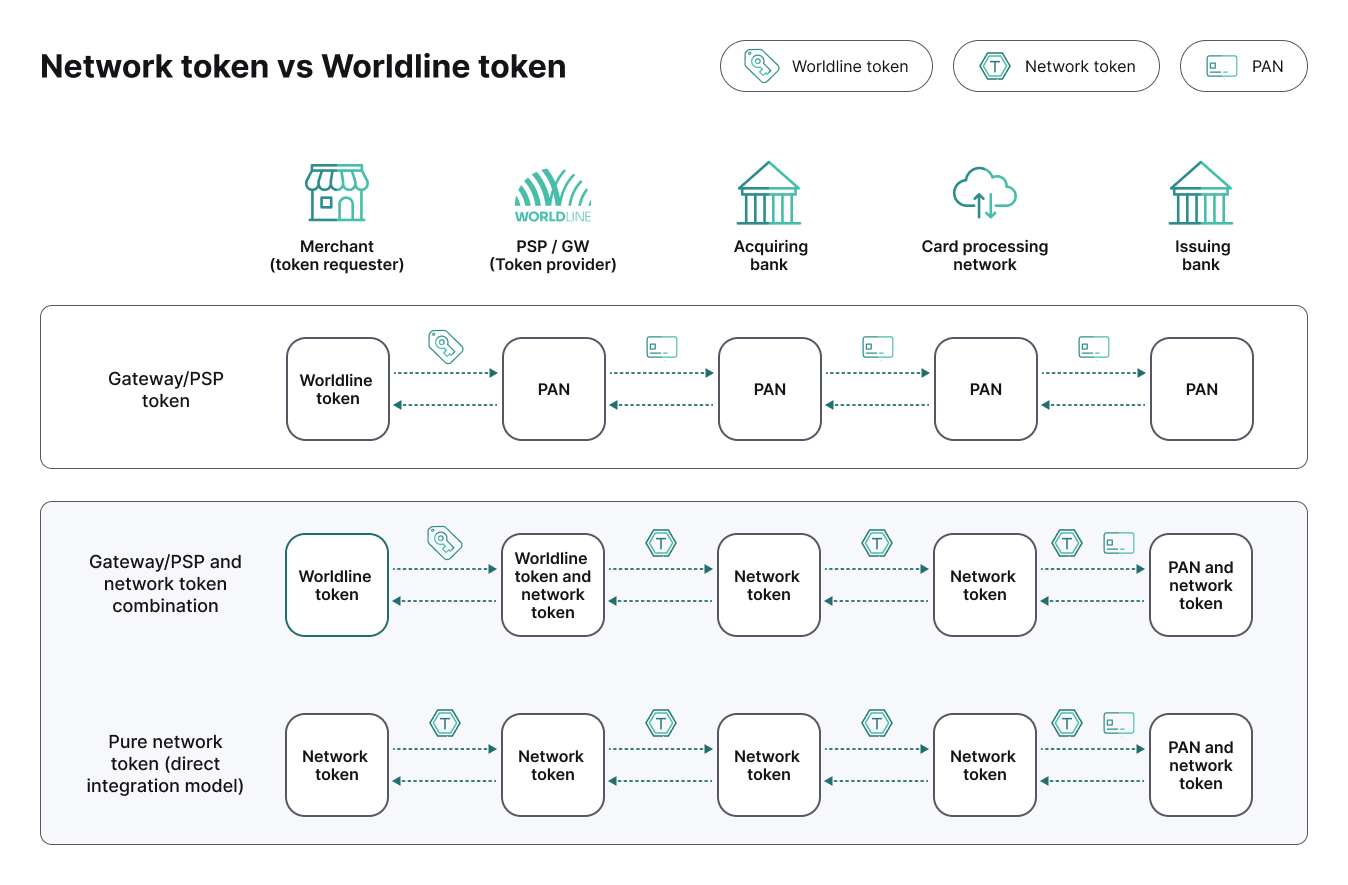
Network tokens and Worldline tokens serve different roles in digital payments. Each token type provides distinct capabilities and lifecycle management rules.
Network tokens
Network tokens are issued directly by card networks to replace a consumer's Primary Account Number (PAN). Each token is dynamically linked to the original card but restricted to your specific domain, so it cannot be used outside its intended context. Network tokens remain interoperable across the wider payment ecosystem.
When the underlying card expires, is reissued, or is reported lost or stolen, the card issuer automatically updates the token in the background. You continue processing with the same token without asking consumers for updated details or performing manual adjustments.
Worldline tokens
Worldline tokens are proprietary payment tokens created and managed by Worldline. When you tokenize card details, Worldline securely stores the card data in our vaults and generates a unique token for future transactions.
Storing a Worldline token removes sensitive cardholder data from your systems while allowing you to process recurring or subsequent payments through Worldline. Because Worldline tokens are specific to our platform, you can only use them to process payments through Worldline.
Unlike network tokens, Worldline tokens do not receive automatic lifecycle updates directly from card issuers unless you enable Account Updater. Without Account Updater, an expired or replaced card requires updated payment details from the consumer.
Operational differences
Both network tokens and Worldline tokens replace sensitive card details with a secure identifier for future transactions. The primary difference is who creates and manages the credential: card networks issue and manage network tokens across the broader payment ecosystem, while Worldline issues and manages Worldline tokens to reference card data securely stored on our platform.
Lifecycle updates also differ when a card changes. Network tokens receive automatic updates as part of the core network tokenization service. Worldline tokens stay up to date through Account Updater, which queries card network databases to retrieve and apply new card details as they become available.
 (1).png?language_id=1)
How do network tokens work?
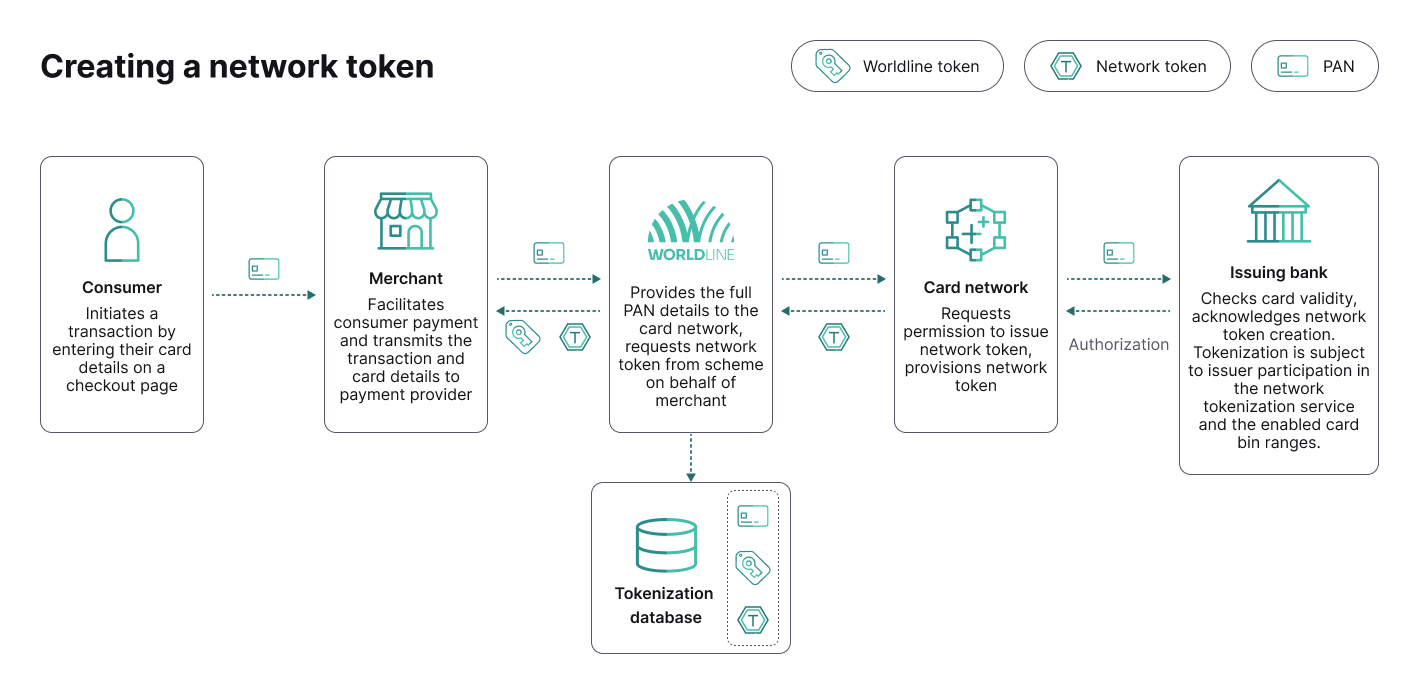
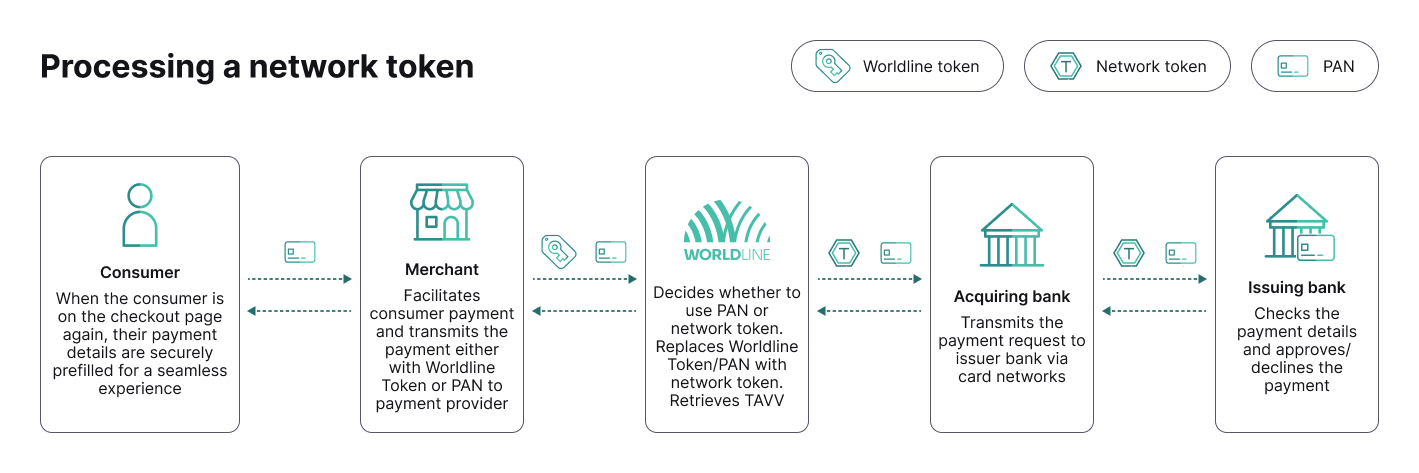
After a consumer completes their first successful payment on your website, we replace their card number with a unique identifier called a network token. On subsequent purchases, when the consumer returns to your site, the network token is submitted instead of their actual card details. This means the sensitive payment credentials are not transmitted or stored with each transaction.
The below flow shows the process of creating a network token:
 (1).png?language_id=1)
Each time a consumer initiates a transaction using a saved card, the card scheme generates a unique cryptogram specific to that transaction. This cryptogram is tied to the specific token, merchant, and transaction context. The cryptogram remains valid until it is used.
 (1).png?language_id=1)
Get network token data
When network tokenization is used, additional data can be returned in your payment responses to give you more visibility and control over your transactions. These data points give you deeper insight into how your payments perform and how your customers transact. By leveraging network token data, you can improve reporting, optimize payment performance, and gain a more complete view of your customers while maintaining a secure and compliant payment environment.
- networkToken: It is a secure alternative to the full card number (PAN). It represents the consumer’s card in a tokenized format and is used for processing transactions without exposing sensitive card data. By default, the token may be obfuscated. If you require access to the full (non-obfuscated) network token, please contact your account manager.
- tokenExpiryDate: The expiry date of the network token, indicates the validity of the network token.
- tokenReferenceId: A unique identifier associated with the network token. It can be used with services such as Visa Token Service (VTS) and Mastercard Digital Enablement Service (MDES) to retrieve additional token details. The reference remains valid for as long as the token is active.
A prefix "V:" is added to show that this is a network token for a Visa product and "M:" to show that this is a network token for a Mastercard product.
- networkTokenUsed: Shows if a network token was used during the payment. This enables you to monitor adoption of network tokenization, to compare performance between tokenized and non-tokenized transactions and to measure improvements in approval rates.
- paymentAccountReference: A unique reference to the primary account number. Payment Account Reference provides a consolidated view of transactions associated with a PAN and its affiliated tokens, making it easier to identify customers and their associated transactions across payment channels.
Maximizing authorization success
By refreshing the dynamic security verification for every individual attempt, we minimize unnecessary rejections and maximize the number of successful payments for your business. For every authorization request, including retries across different banks, we generate a new, unique, and time-sensitive security code. This ensures that even if a previous attempt was declined, the bank receives a new, distinct verification for the retry.
Sharing tokens across your accounts
If you operate on multiple websites or apps, network tokenization allows you to create a unified payment experience across all of them.
When a consumer saves their card on one of your platforms, that same token can be recognized and reused across your other accounts. This makes repeat purchases faster and more convenient no matter where they interact with your brand. This provides a consistent checkout experience across all channels, higher conversion and repeat purchase rates.
To enable network token sharing across your accounts, enabled merchant accounts (Contract IDs) should be part of the same merchant group.
Boarding
To prepare for network token enablement and go through a full boarding process, contact your Account Manager.
Integration
You have two options when it comes to processing network token payments. You can either use our tokens, or directly initiate payments on our platform and use your own tokenization provider. Both options are available to you, so you can choose the one that best suits your needs.
Using our tokens
If you're looking for the quickest way to process payments with network tokens, tokenization is the optimal solution for an easy implementation. You can submit your payment using MyCheckout hosted payment pages or a Create payment endpoint depending on your current implementation with us.
Submit the payment as you do today for card payments, including the Card On File or Recurring objects.
Using Mycheckout hosted payment pages
- Make a POST /v1/{merchantId}/hostedcheckouts API call.
- Additionally add the unscheduledCardOnFileRequestor and unscheduledCardOnFileSequenceIndicator or recurring properties. The unscheduledCardOnFileRequestor indicates which party initiated the unscheduled recurring transaction. Allowed properties are the following:
- merchantInitiated - merchant initiated transaction.
- cardholderInitiated - cardholder initiated transaction.
- unscheduledCardOnFileSequenceIndicator:
- first transaction = this transaction is the first of a series of unscheduled recurring transactions.
- subsequent transaction = this transaction is a subsequent transaction in a series of unscheduled recurring transactions
- recurringPaymentSequenceIndicator:
- first = This transaction is the first of a series of recurring transactions
- recurring = This transaction is a subsequent transaction in a series of recurring transactions for payments that are processed by the WL Online Payment Acceptance platform
Below, you'll find an example request containing the essential data. For more information, please refer to our API Reference.
{
  "cardPaymentMethodSpecificInput": {
    "unscheduledCardOnFileRequestor": "cardholderInitiated",
    "unscheduledCardOnFileSequenceIndicator": "first",
    "card": {
      "cvv": "123",
      "cardNumber": "5186151650005081",
      "expiryDate": "1230",
      "cardholderName": "John Doe"
    },
    "tokenize": true,
    "paymentProductId": 3,
    "transactionChannel": "ECOMMERCE",
    "threeDSecure": {
      "skipAuthentication": true,
      "redirectionData": {
        "returnUrl": "https://hostname.myownwebsite.url"
      }
    }
  },
  "order": {
    "amountOfMoney": {
      "currencyCode": "USD",
      "amount": 100
    },
    "customer": {
      "billingAddress": {
        "countryCode": "US"
      },
      "merchantCustomerId": "1234"
    }
  }
}
The following API response will look like this:
- If the same card was network tokenized before the first payment, network token data will be included in the response. Otherwise, it will be returned in the next CIT (customer initiated transaction) or MIT (merchant initiated transaction) payment with the same card.
- In the example below, the response already has a network token as the card was already tokenized, that's why it's returned.
{
  "creationOutput": {
    "additionalReference": "00000739171000000190",
    "externalReference": "000007391710000001900000100001",
    "tokenizationSucceeded": false
  },
  "payment": {
    "id": "000007391710000001900000100001",
    "paymentOutput": {
      "amountOfMoney": {
        "amount": 100,
        "currencyCode": "USD"
      },
      "references": {
        "paymentReference": "0",
        "providerId": "6100",
        "providerReference": "000JED15ftjKC001001"
      },
      "paymentMethod": "card",
      "cardPaymentMethodSpecificOutput": {
        "paymentProductId": 3,
        "authorisationCode": "000982",
        "fraudResults": {
          "fraudServiceResult": "no-advice",
          "avsResult": "E",
          "cvvResult": "0"
        },
        "schemeTransactionId": "ATID00000982",
        "card": {
          "cardNumber": "************5081",
          "cardholderName": "John Doe",
          "expiryDate": "1230"
        },
        "clickToPayUsed": false,
        "networkTokenData": {
          "networkToken": "************6473",
          "tokenExpiryDate": "1029",
          "tokenReferenceId": "M:erHxplGeS2y2NJAKT9o_DA000000000000GB"
        },
        "networkTokenUsed": true,
        "paymentAccountReference": "500135RFLPNT3TKPFPYQGNDRYKQ4Z"
      }
    },
    "status": "CAPTURE_REQUESTED",
    "statusOutput": {
      "isCancellable": true,
      "isRetriable": false,
      "statusCategory": "PENDING_CONNECT_OR_3RD_PARTY",
      "statusCode": 800,
      "statusCodeChangeDateTime": "20260918152938",
      "isAuthorized": true,
      "isRefundable": false
    }
  }
}
A network token created after the first successful payment will be visible in a get payment API call, like in the example shown below.
{
  "id": "000000999110099432300000100001",
  "paymentOutput": {
    "amountOfMoney": {
      "amount": 100,
      "currencyCode": "USD"
    },
    "references": {
      "paymentReference": "0",
      "providerId": "3100"
    },
    "paymentMethod": "card",
    "cardPaymentMethodSpecificOutput": {
      "paymentProductId": 3,
      "fraudResults": {
        "fraudServiceResult": "accepted",
        "avsResult": "Y",
        "cvvResult": "0",
        "retailDecisions": {
          "fraudCode": "0100",
          "fraudNeural": "0"
        }
      },
      "schemeTransactionId": "3675703970925",
      "card": {
        "cardNumber": "518615******5081",
        "cardholderName": "John Doe",
        "expiryDate": "1230"
      },
      "clickToPayUsed": false,
      "networkTokenData": {
        "networkToken": "5186151669039287",
        "tokenExpiryDate": "1029",
        "tokenReferenceId": "M:DM4MMC1GB0000000aec7d28f0d6745dbaebfe6ff436f340b"
      },
      "networkTokenUsed": true,
      "paymentAccountReference": "500135RFLPNT3TKPFPYQGNDRYKQ4Z"
    }
  },
  "status": "CAPTURE_REQUESTED",
  "statusOutput": {
    "isCancellable": true,
    "isRetriable": false,
    "statusCategory": "PENDING_CONNECT_OR_3RD_PARTY",
    "statusCode": 800,
    "statusCodeChangeDateTime": "20260925222521",
    "isAuthorized": true,
    "isRefundable": false
  }
}
Below, you'll find an example request containing the essential data for a subsequent payment. For more information, please refer to our API Reference.
{
  "cardPaymentMethodSpecificInput": {
    "unscheduledCardOnFileRequestor": "cardholderInitiated",
    "unscheduledCardOnFileSequenceIndicator": "subsequent",
    "card": {
      "cvv": "123",
      "cardNumber": "5186151650005081",
      "expiryDate": "1230",
      "cardholderName": "John Doe"
    },
    "paymentProductId": 1,
    "transactionChannel": "ECOMMERCE",
    "threeDSecure": {
      "skipAuthentication": true,
      "redirectionData": {
        "returnUrl": "https://hostname.myownwebsite.url"
      }
    }
  },
  "order": {
    "amountOfMoney": {
      "currencyCode": "USD",
      "amount": 100
    },
    "customer": {
      "billingAddress": {
        "countryCode": "US"
      },
      "merchantCustomerId": "1234"
    }
  }
}
The response will look like this:
{
  "creationOutput": {
    "additionalReference": "00000739171000000191",
    "externalReference": "000007391710000001910000100001"
  },
  "payment": {
    "id": "000007391710000001910000100001",
    "paymentOutput": {
      "amountOfMoney": {
        "amount": 100,
        "currencyCode": "USD"
      },
      "references": {
        "paymentReference": "0",
        "providerId": "6100",
        "providerReference": "000JED15ftjLC001001"
      },
      "paymentMethod": "card",
      "cardPaymentMethodSpecificOutput": {
        "paymentProductId": 3,
        "authorisationCode": "000983",
        "fraudResults": {
          "fraudServiceResult": "no-advice",
          "avsResult": "E",
          "cvvResult": "0"
        },
        "schemeTransactionId": "ATID00000983",
        "card": {
          "cardNumber": "************5081",
          "cardholderName": "John Doe",
          "expiryDate": "1230"
        },
        "clickToPayUsed": false,
        "networkTokenData": {
          "networkToken": "************6473",
          "tokenExpiryDate": "1029",
          "tokenReferenceId": "S:erHxplGeS2y2NJAKT9o_DA000000000000GB"
        },
        "networkTokenUsed": true,
        "paymentAccountReference": "500135RFLPNT3TKPFPYQGNDRYKQ4Z"
      }
    },
    "status": "CAPTURE_REQUESTED",
    "statusOutput": {
      "isCancellable": true,
      "isRetriable": false,
      "statusCategory": "PENDING_CONNECT_OR_3RD_PARTY",
      "statusCode": 800,
      "statusCodeChangeDateTime": "20260918153115",
      "isAuthorized": true,
      "isRefundable": false
    }
  }
}
Using self-managed tokens
You can send us the network tokens provisioned by your token provider directly in payment request.
- Make a POST /v1/{merchantId}/payments API call.
- If you use a third party authentication provider, make sure to include necessary 3DS data in externalCardholderAuthenticationData, please refer to our API Reference for more information.
Below, you'll find an example request, the provided network token would be authenticated by us.
{
  "cardPaymentMethodSpecificInput": {
    "unscheduledCardOnFileRequestor": "cardholderInitiated",
    "unscheduledCardOnFileSequenceIndicator": "subsequent",
        "networkTokenData": {
            "cardholderName": "John Doe",
            "cryptogram": "APBNBAOZhwKGAAL6ngQmAAADFA==",
            "networkToken": "5555555555554444",
            "tokenExpiryDate": "0529"
        },
    "paymentProductId": 1,
    "threeDSecure": {
      "skipAuthentication": true,
      "redirectionData": {
        "returnUrl": "https://hostname.myownwebsite.url"
      }
    }
  },
  "order": {
    "amountOfMoney": {
      "currencyCode": "USD",
      "amount": 100
    },
    "customer": {
      "billingAddress": {
        "countryCode": "US"
      },
      "merchantCustomerId": "1234"
    }
  }
}
This will return a response like this:
{
  "creationOutput": {
    "additionalReference": "00000739171000000192",
    "externalReference": "000007391710000001920000100001"
  },
  "payment": {
    "id": "000007391710000001920000100001",
    "paymentOutput": {
      "amountOfMoney": {
        "amount": 100,
        "currencyCode": "USD"
      },
      "references": {
        "paymentReference": "0",
        "providerId": "6100",
        "providerReference": "000JED15ftjMC001001"
      },
      "paymentMethod": "card",
      "cardPaymentMethodSpecificOutput": {
        "paymentProductId": 3,
        "authorisationCode": "000984",
        "fraudResults": {
          "fraudServiceResult": "no-advice",
          "avsResult": "E",
          "cvvResult": "0"
        },
        "schemeTransactionId": "ATID00000984",
        "clickToPayUsed": false,
        "networkTokenData": {
          "networkToken": "************4444",
          "tokenExpiryDate": "0529"
        },
        "networkTokenUsed": true
      }
    },
    "status": "CAPTURE_REQUESTED",
    "statusOutput": {
      "isCancellable": true,
      "isRetriable": false,
      "statusCategory": "PENDING_CONNECT_OR_3RD_PARTY",
      "statusCode": 800,
      "statusCodeChangeDateTime": "20260918153204",
      "isAuthorized": true,
      "isRefundable": false
    }
  }
}
Process flows
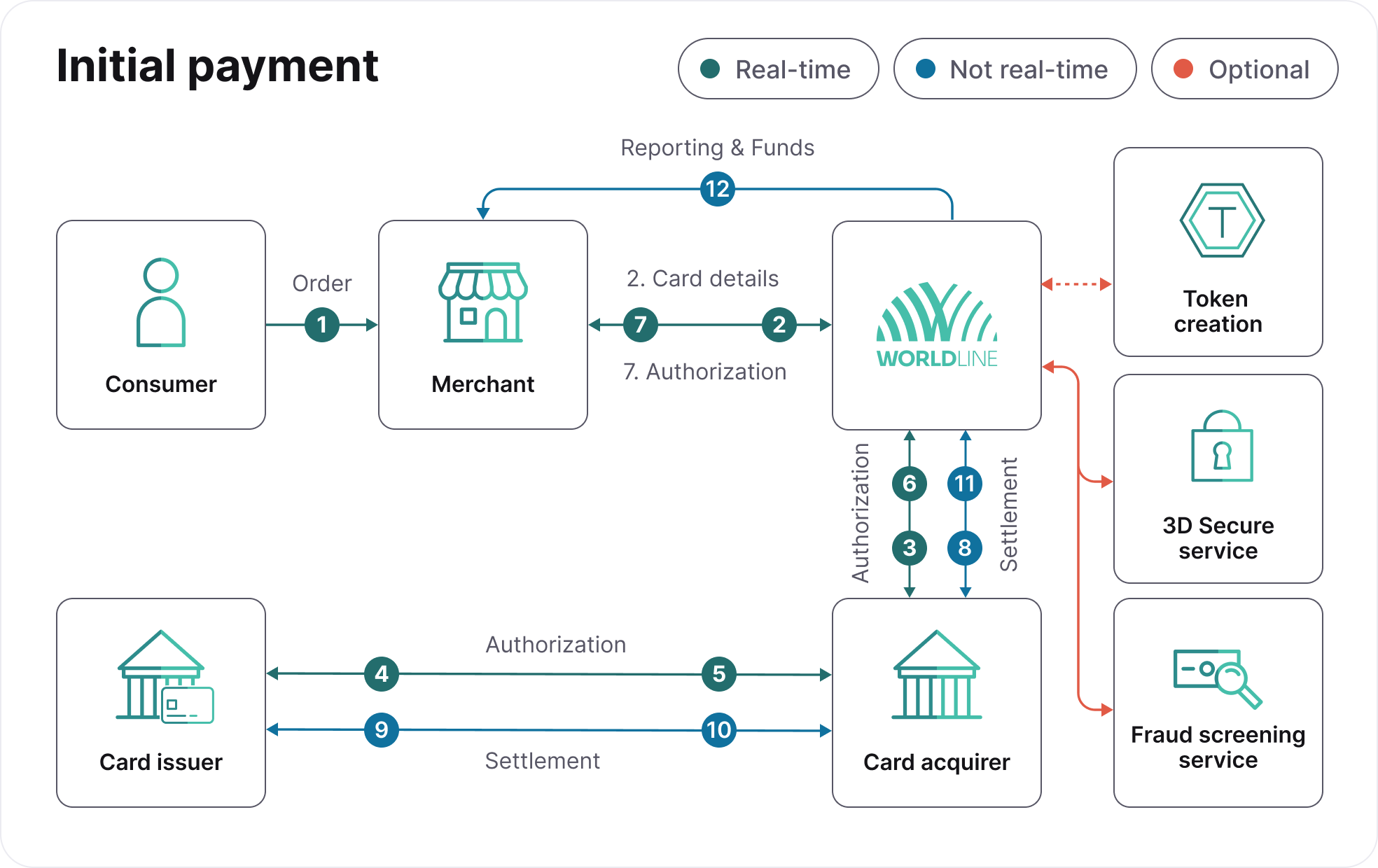
Below, you'll find a detailed explanation on how network tokens are integrated into your initial flow and subsequent flow.
 (2).png?language_id=1)
- Consumer places an order with you.
- You send card details to us.
- We send authorization request to Card acquirer (optional: token creation, 3-D Secure, and fraud screening).
- Card acquirer sends authorization request to Card issuer.
- Card issuer returns authorization result to Card acquirer.
- Card acquirer returns authorization result to us.
- We return authorization result to you.
- We send settlement request to Card acquirer.
- Card acquirer sends settlement to Card issuer.
- Card issuer sends funds to Card acquirer.
- Card acquirer sends funds to us.
- We send reporting and funds to you.
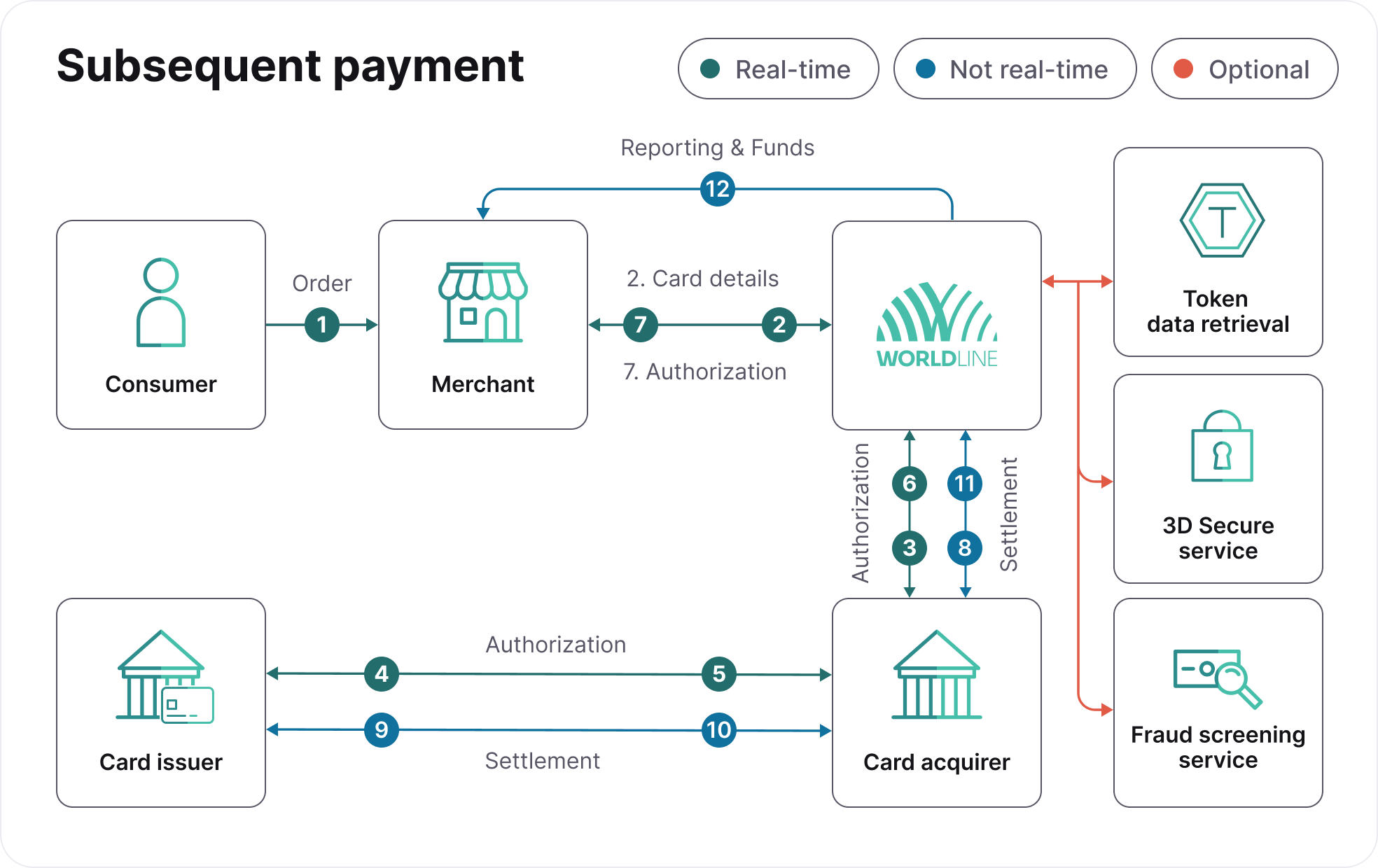 (2).png?language_id=1)
- Consumer places an order with you.
- You send card details to us.
- We send authorization request to Card acquirer (optional: token data retrieval, 3-D Secure, and fraud screening).
- Card acquirer sends authorization request to Card issuer.
- Card issuer returns authorization result to Card acquirer.
- Card acquirer returns authorization result to us.
- We return authorization result to you.
- We send settlement request to Card acquirer.
- Card acquirer sends settlement to Card issuer.
- Card issuer sends funds to Card acquirer.
- Card acquirer sends funds to us.
- We send reporting and funds to you.
Testing
You can test network token functionality in the API explorer in our Configuration Center pre-production environment.
If you want to access network token testing, please contact your account manager, who will guide you through the enablement process. We will register you within card scheme sandbox environments and configure the necessary feature flags on your behalf.
Example testing cards you can use to test network tokens:
| Card | Card number | Expiry date |
|---|---|---|
| Master Card | 5186151650005081, 2222850250001001 | 27.12 |
| Visa | 4895379980026387,4895379980026486 | 27.12 |
FAQ
Do I still need Account Updater if I am using network tokens?
In most cases, no. Card networks automatically update network tokens when cards expire or are reissued. However, Account Updater still provides value if an issuing bank's BIN does not support network tokenization, or when you process transactions using raw card details before a network token is fully provisioned. In these cases, Account Updater maintains payment continuity by retrieving the latest card details.
What is the best setup: profile tokens, network tokens, or both with Account Updater?
The most effective setup is a combination of all three. Use profile tokens to manage repeat and recurring transactions securely within our platform. Pair them with network tokens to increase authorization rates and receive automatic lifecycle updates directly from card networks. Keep Account Updater as a fallback to update card details when an issuer does not support network tokenization. Together, this combination ensures maximum payment continuity and performance across your entire payment flow.
How do network tokens and profile tokens work together?
Profile tokens store the consumer’s payment method within your system, while network tokens enhance how those credentials are processed. In practice you store a profile token, and at the time of payment, it is mapped to a network token which is used for authorization. This way you get both flexibility and performance.
What should I use for recurring payments: Network tokens or Account Updater?
For recurring payments, network tokens should be your primary choice. They ensure that payment credentials remain automatically up to date, improve authorization rates through stronger issuer trust, and significantly reduce failed renewals caused by expired or replaced cards. Account Updater can complement this strategy by providing coverage in scenarios where network tokenization is not available.
What happens if network token provisioning fails or is delayed?
If a network token is not available, the transaction can still be processed using the card details. Account Updater can help keep those details up to date. This ensures no impact on checkout or transaction success.
Can I use network tokens across multiple payment service providers or acquirers?
Network tokens are generally portable across providers, particularly for recurring and merchant-initiated transactions (MIT), which allows you to maintain continuity even when working with multiple payment service providers or acquirers.
Does reusing the same token across retries cause issues?
No, the token itself remains valid across multiple attempts. What is important is that each consumer initiated transaction is supported by a fresh cryptogram and properly re-authenticated. This ensures that every authorization attempt is evaluated independently by issuers, rather than being treated as a repeat of a previous transaction, thereby improving approval outcomes. Tokens can be used without cryptograms for merchant initiated transactions.
Does network tokenization help with Strong Customer Authentication (SCA) and authentication?
Yes. Network tokens transmit cryptograms and domain-specific data that help issuing banks evaluate transactions as lower risk. This often reduces the likelihood of step-up challenges, allowing more transactions to pass without extra authentication steps and improving conversion.
Network tokenization fully supports 3D Secure when verification is necessary, ensuring compliance with PSD2. Network tokens are not exempt from SCA rules, so issuing banks may still request authentication depending on transaction context and risk.