

Process flows
In order to integrate PagoEfectivo, please refer to our API Reference.
Cash payments transaction states
- CREATED – initial state of a transaction. If a transaction remains in this state, it indicates a problem.
- CAPTURED – the transaction was completed successfully, and we have received confirmation that the funds are on their way.
- PAID – we have collected the funds and will begin the remittance process to you.
- EXPIRED - we received notification that the consumer has not completed the payment on time.
- REJECTED – the transaction was rejected by either us or the bank. This is the final state.
- REFUNDED – state indicates that the transaction has been successfully reversed, and the funds have been returned to the consumer.
Payment flow
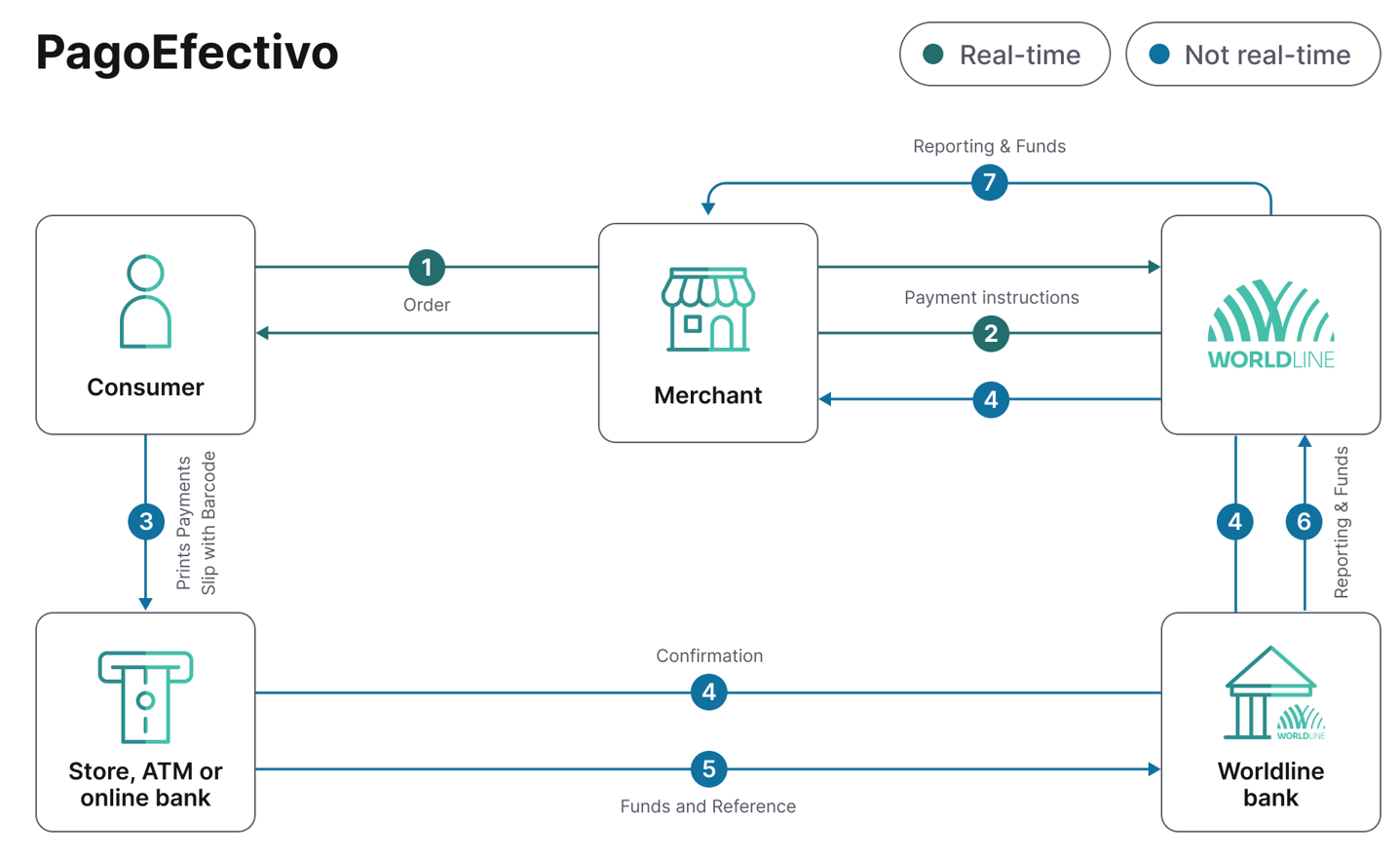
- Consumer places order on your website and chooses PagoEfectivo as the payment product. You need to initiate the order at us accordingly.
- We will return a voucher with a QR code.
- The consumer pays the voucher with the QR code in cash at a wide network of affiliated physical locations or at their bank.
- PagoEfectivo will send us a notification once the payment was completed, and the status is updated in the Payment Console. Once the payment is with status CAPTURED, you can release the product to the consumer.
- Funds are transferred to us.
- We match the payment on the basis of the consumers reference number.
- We remit the funds and provide you with a detailed report.