

Process flows
In order to integrate Pix, please refer to our API Reference.
Pix transaction states
- CREATED – initial state of a transaction. If a transaction remains in this state, it indicates a problem.
- PENDING APPROVAL – the transaction is awaiting your approval to capture the funds. This applies to transactions requiring manual merchant approval before processing.
- CAPTURED – the transaction was completed successfully, and we have received confirmation that the funds are on their way.
- PAID – we have collected the funds and will begin the remittance process to you.
- CANCELLED – the payment was canceled by either you or the consumer. This is the final state.
- REFUND REQUESTED – the payment refund was requested by the consumer.
- REFUND PENDING – the transaction is awaiting your approval for refund.
- REFUNDED – this is a final state indicating the funds have been refunded to the consumer.
Payment flow
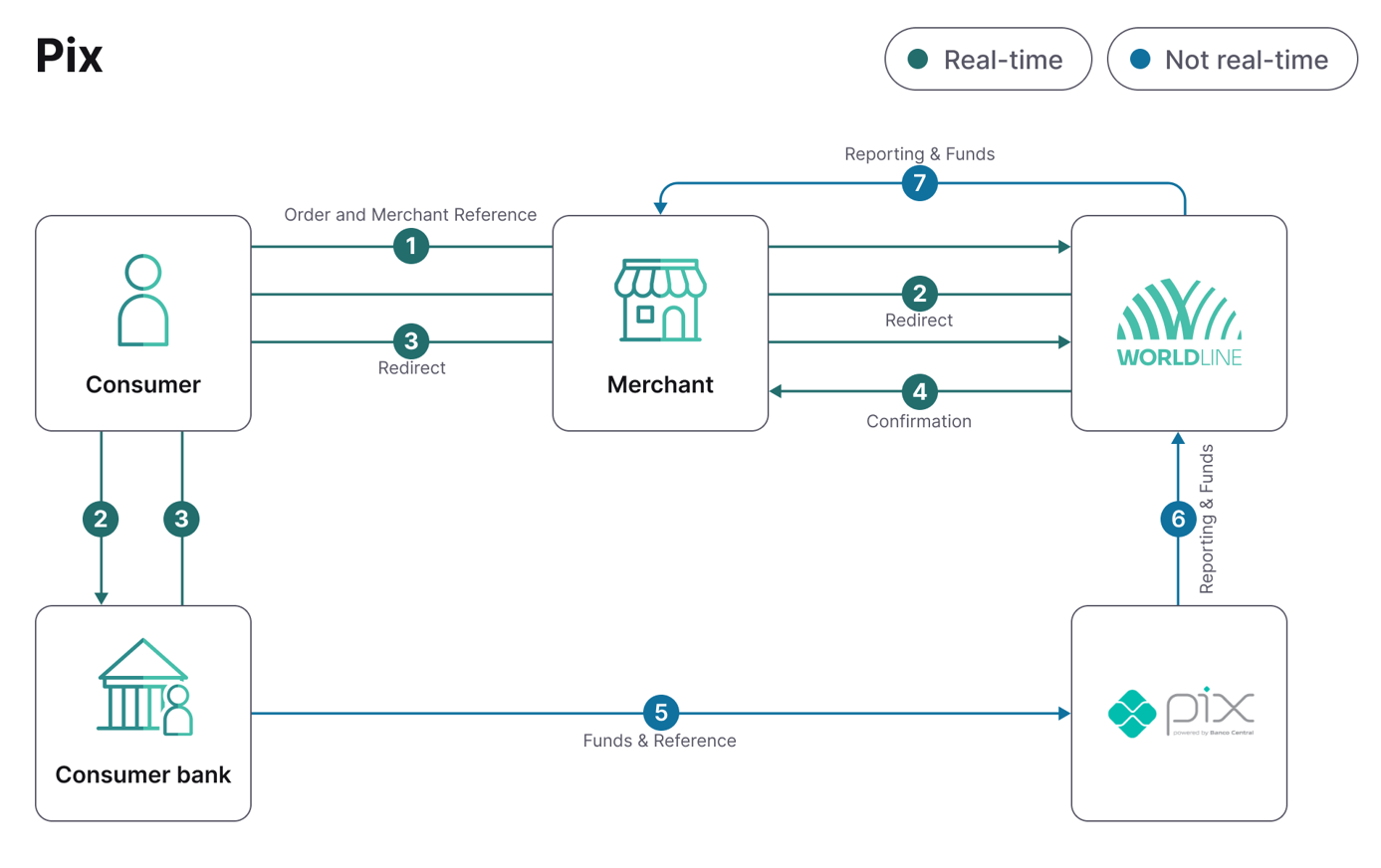
- The consumer places an order and selects Pix as the payment option.
- The consumer is redirected to Pix payment page, which displays a QR code and copy and paste code.
- The consumer scans the QR code with their bank app or copy and paste the code on their bank app.
- The payment status is updated and communicated to you.
- The consumer's bank sends the funds and references to Pix, which is forwarded to us.
- We receive the funds and gather statements to process all incoming payments.
- We remit the funds and provide you with a detailed report.