Testing
Test card generator
You can use our Test card generator and API Reference to create payments and receive responses based on your selected test scenarios. You can use our API Explorer to test your integration. Testing is available only in pre-production. To activate our advanced Card-based Payment Testing Simulator on your merchant ID, contact our boarding team.
To validate your integration, you can select the card payment product you want to test as well as the outcome of the test case you want to validate. Based on your selection, you will receive a card number and additional details you can put in your API request.
Follow these simple steps to start testing:
- Select payment product for which you want to generate test data. Test data is only available for payment products configured with your merchant ID.
- Select issuing country. This shows the card issuer's country where the account is registered, which determines 3D Secure usage. If your country isn't listed, select one from the same region (in brackets) for similar payment processing behavior.
- Specify card type. Card types are distinguished based on their features and usage. These types determine the card's functionality, such as the processing flow or associated benefits. System will automatically choose the default value if no selection is made.
- Select co-badged scenario if required. Co-badged cards feature several payment brands, allowing acceptance through the networks of each brand and increasing versatility.
- This field will be enabled or disabled for selection depending on the payment product chosen.
- Choose a 3D Secure & Strong Customer Authentication (SCA) testing scenario. This enhances online card transaction security with additional verification steps:
- Authentication type: Indicates the 3D Secure process, where the issuer may request additional data from the consumer during transactions.
- Authentication result: Shows the issuer's authentication level, affecting liability and next steps.
- Exemption result: Indicates if a transaction can skip extra authentication steps in 3D Secure based on its risk assessment.
- Select fraud management testing scenario:
- CVV result: Response from the card issuer when the Card Verification Value (CVV) is submitted during the authorization.
- AVS result: Address Verification Service (AVS) compares the cardholder's billing address with the issuer. It's mainly used for cards from the US, Canada, UK, and France.
- Fraud service result: Our tool evaluates transactions for risk and flags suspicious activities, with results displayed in the API response.
- System will automatically choose the default value if no selection is made.
- Choose authorization result to test if the card issuer approves or declines your transaction request. The result will be shown in the API response:
- Successful: Transaction is approved and authorized.
- Unsuccessful: Transaction is declined or rejected.
- System will automatically choose "Successful" as default value if no selection is made.
- Select authorization scenario for unsuccessful results. These are provided when the issuing bank declines an authorization request.
- This field will be available for selection when authorization result has been chosen as "Unsuccessful".
- System will automatically choose the default value if no selection is made.
- Specify refund scenario by selecting how the API should respond when processing refunds for this test card:
- This field will be available for selection when authorization result is "Successful".
- System will automatically choose "Successful" as default value if no selection is made.
- Generate test card. Click on "Generate" button to generate test card and other test data based on your selected testing scenario. To generate new test with new properties, you can reset your selection. Use this test card and other generated test data in your hosted checkouts or S2S API request towards Worldline and receive the response for the chosen scenario.
- Reset for new scenario. If you want to generate a new test scenario, click on the "Reset" button and choose new test card and data corresponding to a new test scenario.
Test scenarios
Positives
Below are the positive test case input definitions with the expected results in the last 4 columns. Positive in this context means that the payments get an authorization. Be aware that the Fraud service can have influence on the final payment status.
| Card number | CVV | Expiry Date | Amount | Currency code | Country code | Payment product ID | Auth code | AVS result | CVV result | Payment status ID |
|---|---|---|---|---|---|---|---|---|---|---|
| 4012000033330026 | 123 | 3500 | USD | US | 1 | OK2334 | Y | 0 | 600 | |
| 4567350000427977 | 123 | 4005 | USD | US | 1 | OK1131 | 0 | 0 | 600 | |
| 4012000033330026 | 999 | 1100 | USD | US | 1 | OK1131 | 0 | 0 | 600 | |
| 4012000077777777 | 123 | 999 | CAD | CA | 1 | OK1419 | Y | 0 | 600 | |
| 4012000033330026 | 123 | 1700 | CAD | CA | 1 | OK1175 | 0 | P | 600 | |
| 4012000033330026 | 123 | 1000 | CAD | CA | 1 | OK1178 | 0 | P | 600 | |
| 4012000033330026 | 123 | 1100 | USD | US | 1 | OK1180 | 0 | 0 | 600 | |
| 4012000033330026 | 124 | 1100 | CAD | CA | 1 | OK2316 | N | 0 | 600 | |
| 4500600000000061 | 123 | 10100 | USD | US | 1 | OK2319 | B | 0 | 600 | |
| 4500600000000061 | 123 | 10200 | CAD | CA | 1 | OK2322 | C | 0 | 600 | |
| 4012000033330026 | 123 | 9200 | CAD | CA | 1 | OK2324 | Y | M | 600 | |
| 4012000033330026 | 123 | 8744 | USD | US | 1 | OK232C | Y | 0 | 600 | |
| 4012000033330026 | 123 | 5500 | USD | US | 1 | OK2329 | Y | S | 600 | |
| 4012000033330026 | 123 | 2000 | USD | US | 1 | OK2331 | Y | 0 | 600 | |
| 4012000033330026 | 123 | 3500 | CAD | CA | 1 | OK2334 | Y | 0 | 600 | |
| 4012000033330026 | 123 | 11065 | USD | US | 1 | OK2371 | Z | P | 600 | |
| 4012000033330026 | 123 | 111 | CAD | CA | 1 | OK2372 | Z | P | 600 | |
| 4012000033330026 | 123 | 11062 | USD | US | 1 | OK2404 | Z | P | 600 | |
| 4012000033330026 | 123 | 1101 | USD | US | 1 | OK2419 | Z | P | 600 | |
| 4012000033330026 | 125 | 1100 | CAD | CA | 1 | OK5830 | N | 0 | 600 | |
| 4012000033330026 | 123 | 11012 | CAD | CA | 1 | OK5833 | Z | P | 600 | |
| 4012000033330026 | 123 | 1200 | USD | US | 1 | OK5834 | Y | 0 | 600 | |
| 4012000033330026 | 123 | 1500 | USD | US | 1 | OK5835 | U | 0 | 600 | |
| 4063651370499176 | 123 | 1000 | CAD | CA | 1 | OK1131 | X | M | 600 | |
| 4063651370499176 | 123 | 1100 | USD | US | 1 | OK1131 | N | M | 600 | |
| 4012001038443335 | 123 | 1000 | CAD | CA | 1 | OK1131 | X | M | 600 | |
| 4187603025743962 | 123 | 1000 | CAD | CA | 1 | OK1131 | X | M | 600 | |
| 4063651370499176 | 123 | 321 | USD | US | 1 | OK1131 | X | M | 600 | |
| 4063651370499176 | 123 | 500 | USD | US | 1 | OK1131 | X | M | 600 | |
| 4063651370499176 | 123 | 0 | CAD | CA | 1 | OK1131 | X | 0 | 3001 | |
| 4539791001730106 | 123 | 140 | CAD | CA | 1 | OK1131 | 0 | 0 | 600 | |
| 4063651370499176 | 123 | 2345 | CAD | CA | 1 | OK1131 | X | M | 600 | |
| 4276025067630158 | 123 | 12/2024 | 1000 | RUB | RU | 1 | OK1131 | 600 | ||
| 4276024450233308 | 123 | 12/2024 | 1000 | RUB | RU | 1 | OK1131 | 600 | ||
| 4584118188287409 | 123 | 12/2024 | 1000 | RUB | RU | 1 | OK1131 | 600 | ||
| 4584112640348586 | 123 | 12/2024 | 1000 | RUB | RU | 1 | OK1131 | 600 | ||
|
1 Card verification transactions will only end up in status 300 and will not be settled. Be aware this only works on initial attempt for recurring orders. |
||||||||||
Negatives
The negative cases are simulating transactions that do not get an authorization. There are lots of different reasons why a transaction gets declined. More info what the reasons are, are found in the event code description.
| Card number | CVV | Amount | Currency code | Country code | Payment product ID | Event code | AVS result | CVV result |
|---|---|---|---|---|---|---|---|---|
| 4457010000000009 | 123 | 100 | USD | US | 1 | 430424 | 0 | 0 |
| 4012000033330026 | 123 | 3156 | CAD | CA | 1 | 430475 | 0 | 0 |
| 4012000033330026 | 123 | 3100 | USD | US | 1 | 430327 | 0 | 0 |
| 4543059790016721 | 123 | 3099 | USD | US | 1 | 430424 | 0 | 0 |
| 4012000033330026 | 123 | 2100 | USD | US | 1 | 430409 | Y | 0 |
| 4012000033330026 | 123 | 3155 | CAD | CA | 1 | 430285 | Y | M |
| 4012000033330026 | 123 | 4100 | USD | US | 1 | 430330 | Y | 0 |
| 4012000033330026 | 123 | 6100 | CAD | CA | 1 | 430306 | Y | 0 |
| 4012000033330026 | 123 | 7100 | USD | US | 1 | 430260 | Y | 0 |
| 4012000033330026 | 123 | 8100 | CAD | CA | 1 | 430403 | Y | 0 |
| 4012000088888886 | 123 | 999 | USD | US | 1 | 430475 | 0 | 0 |
| 4263971921001307 | 123 | 100 | CAD | CA | 1 | 430424 | 0 | 0 |
| 4012000033330026 | 123 | 2995 | CAD | CA | 1 | 430285 | Y | 0 |
| 4012000033330026 | 123 | 5200 | USD | US | 1 | 430285 | Y | 0 |
Currencies
To be able to test every single currency as listed in the currency table, please use following details.
| Card number | CVV | Amount | Currency code | Country code | Payment product ID | Auth code | AVS result | CVV result |
|---|---|---|---|---|---|---|---|---|
| 4012000033330026 | 123 | 3500 | See curr. table | NL | 1 | OK2334 | Y | 0 |
Fraud Services
Fraud services are by default enabled. The field CITY is controlling the outcome of the fraud check:
| City | Fraud Result | Payment status |
|---|---|---|
| Amsterdam | A(ccept) | 600/800 |
| Calais | C(hallenged) | 525 |
| Denver | D(eny) | 160 |
For the 525 status a formal decision is required to accept the payment or decline it. The API processchallenged is needed to accept the payment; the status will change to 800. When the payment needs to be declined the CancelPayment will set the status to 99999 (cancelled).
It is also possible to turn off the fraud services per transaction by adding skipFraudService: True to the request. There will be no fraud result in the responses.
3D secure
On payment product id 117 (maestro) 3d secure is enabled as all Maestro transaction are mandated to be processed with 3D secure.
AVS
Address verification is enabled on all cards that support it. Different cases give different AVS result. In case the card type isn’t supporting AVS, the result will always be 0.
Delayed settlement
By default all transaction are set to Delayed settlement, except for the product that don’t support it. In Sale mode, payment will lead to status 800.
In Auth/Capture mode, a payment will lead to status 600, which subsequently requires to do a ApprovePayment to make the status go to 800.
Card verification
Also known as 0$ authorization. This type of transaction is triggered with an amount of 0 and will only return a validated response resulting in a status of 300 and only works on a recurring model.
Refunding
Transactions are not refundable on status Completed with status ID 800, as for that a separate process is scheduled to have the payment end up on a refundable status. Please wait for 1 hour for all your test transactions at status Completed with status ID 800 to be processed like this and set to be ready for refunds.
3D secure handling
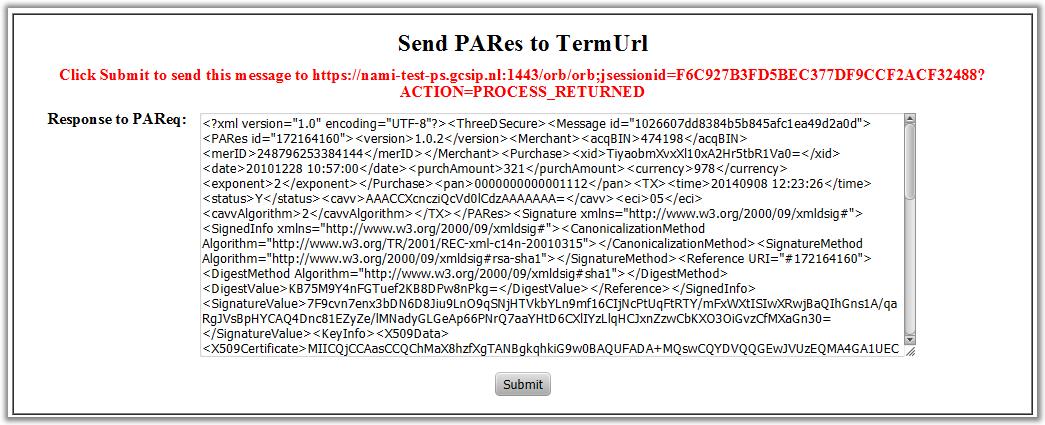
For the handling of transaction with 3D secure a redirect takes place for the consumer. In the Sandbox it will not show a login screen but a functional HTML form that needs to post the 3D secure validation to the payment platform. Please use that process to simulate the authentication process. The post action triggers the right action to be able to finish the payment.
The redirect behavior back and forward are as it would be in real production systems.
Sample of the form: